AsyncAPI Documentation
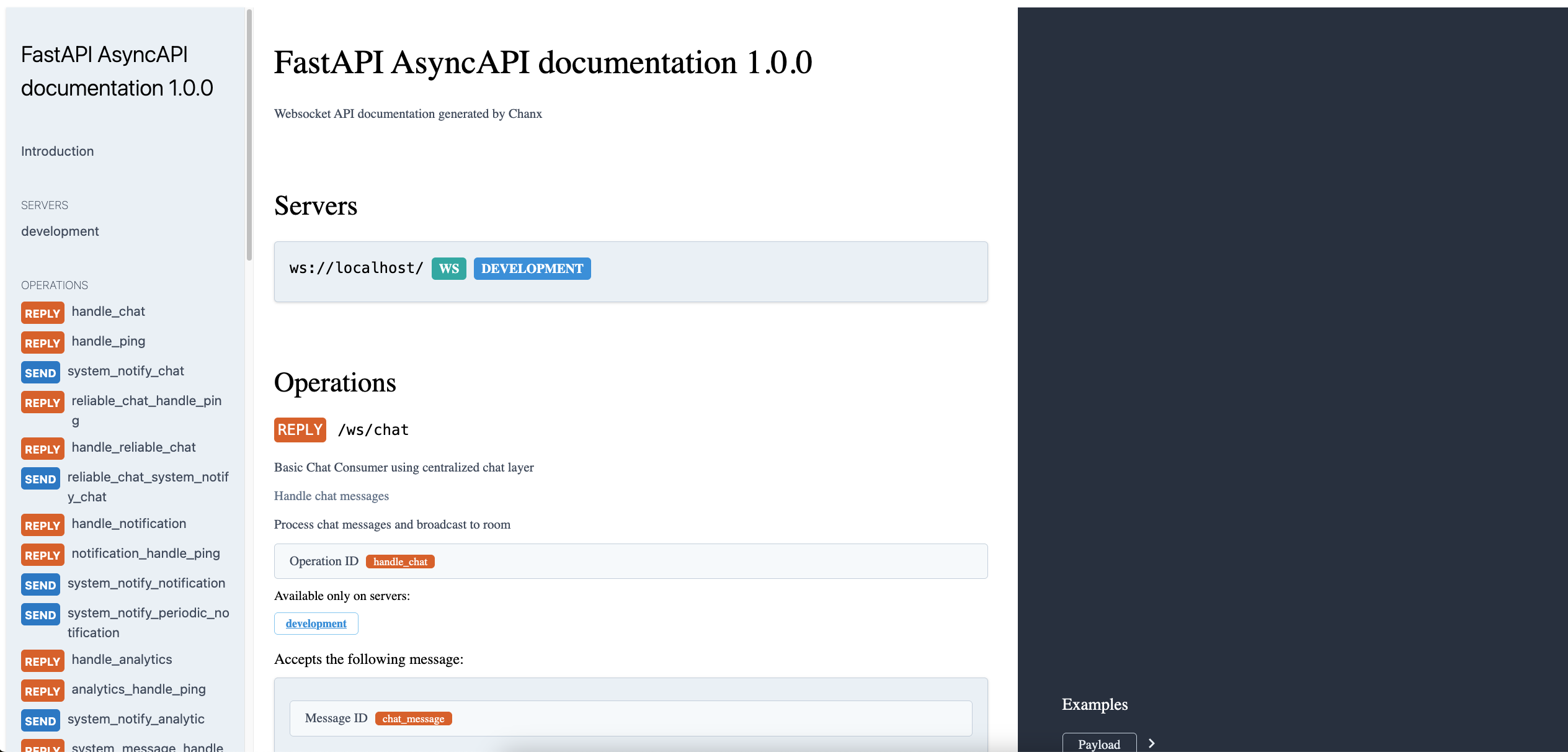
Chanx automatically generates comprehensive AsyncAPI 3.0 documentation directly from your decorated WebSocket consumers. This eliminates the need to maintain separate documentation and ensures your API docs always stay in sync with your code.
What is AsyncAPI?
AsyncAPI is a specification for describing asynchronous APIs, similar to how OpenAPI (Swagger) describes REST APIs. It provides a standardized way to document:
Channels: WebSocket endpoints and their operations
Messages: Input and output message schemas
Operations: What actions each endpoint supports
Servers: Connection information and protocols
Authentication: Security requirements and methods
Benefits of AsyncAPI documentation:
Interactive documentation: Browse and test your WebSocket endpoints
Client generation: Generate client SDKs in multiple languages
Contract-first development: Define APIs before implementation
Team communication: Share clear API contracts with frontend teams
API governance: Ensure consistency across WebSocket APIs
Automatic Documentation Generation
Chanx generates AsyncAPI documentation automatically by analyzing your consumers and their decorators:
@channel(
    name="chat",
    description="Real-time chat system for rooms",
    tags=["chat", "messaging", "real-time"]
)
class ChatConsumer(AsyncJsonWebsocketConsumer):
    @ws_handler(
        summary="Send chat message",
        description="Send a message to all users in the current room",
        tags=["messaging"],
        output_type=ChatNotificationMessage  # Document what gets broadcast
    )
    async def handle_chat(self, message: ChatMessage) -> None:
        await self.broadcast_message(ChatNotificationMessage(...))

    @event_handler(
        summary="Handle user notifications",
        description="Process notification events from the server"
    )
    async def handle_notification(self, event: NotificationEvent) -> NotificationMessage:
        return NotificationMessage(payload=event.payload)
What gets automatically documented:
Channel information from
@channeldecoratorOperations from
@ws_handlerand@event_handlermethodsMessage schemas from Pydantic message classes
Input/output types inferred from method signatures
Discriminated unions built from all message types
Authentication requirements from authenticator classes
Configuring AsyncAPI Settings
Django Configuration:
# settings.py
CHANX = {
    # AsyncAPI documentation settings
    'ASYNCAPI_TITLE': 'My WebSocket API',
    'ASYNCAPI_DESCRIPTION': 'Real-time communication API for my application',
    'ASYNCAPI_VERSION': '2.1.0',
    'ASYNCAPI_SERVER_URL': 'wss://api.myapp.com',
    'ASYNCAPI_SERVER_PROTOCOL': 'wss',
    'ASYNCAPI_CAMELIZE': False,  # Set to True for camelCase naming
}
FastAPI/Other Frameworks:
from chanx.fast_channels.views import asyncapi_docs, asyncapi_spec_json

# Configure via view parameters
config = {
    "title": "My WebSocket API",
    "version": "2.1.0",
    "description": "Real-time communication API",
    "server_url": "wss://api.myapp.com",
    "server_protocol": "wss",
    "camelize": False  # Set to True for camelCase naming
}

@app.get("/asyncapi.json")
async def get_asyncapi_spec(request: Request):
    return await asyncapi_spec_json(request, app, config)
CamelCase Naming Convention
By default, Chanx uses Python's snake_case naming convention throughout the generated AsyncAPI specification. However, when building APIs for JavaScript/TypeScript clients, you may prefer camelCase naming to match frontend conventions.
The camelize parameter transforms all identifiers in the generated specification from snake_case to camelCase:
What Gets Camelized:
Channel names:
user_notifications→userNotificationsOperation names:
handle_chat_message→handleChatMessageMessage names:
chat_notification_message→chatNotificationMessageSchema property names:
first_name→firstNameSchema required fields:
["user_id", "created_at"]→["userId", "createdAt"]$refpaths for channels, messages, and operations
What Stays as-is:
Schema keys (class names) remain in PascalCase:
UserPayload,ChatMessage(not camelized)
When to Use CamelCase:
Building APIs for JavaScript/TypeScript frontend clients
Generating client SDKs for languages that prefer camelCase
Matching existing frontend naming conventions
Creating API documentation that aligns with client-side code
Example with CamelCase Enabled:
# Define your consumer with Python snake_case
@channel(name="user_registration_channel")
class UserRegistrationConsumer(AsyncJsonWebsocketConsumer):
    @ws_handler
    async def handle_user_registration(self, message: UserRegistrationMessage) -> RegistrationCompleteMessage:
        return RegistrationCompleteMessage(...)

class UserPayload(BaseModel):
    first_name: str
    last_name: str
    user_id: int
Generated with camelize=False (default):
channels:
  user_registration_channel:
    messages:
      user_registration_message:
        $ref: '#/components/messages/user_registration_message'

operations:
  handle_user_registration:
    action: receive
    channel:
      $ref: '#/channels/user_registration_channel'

components:
  schemas:
    UserPayload:
      type: object
      properties:
        first_name:
          type: string
        last_name:
          type: string
        user_id:
          type: integer
      required:
        - first_name
        - last_name
        - user_id
Generated with camelize=True:
channels:
  userRegistrationChannel:
    messages:
      userRegistrationMessage:
        $ref: '#/components/messages/userRegistrationMessage'

operations:
  handleUserRegistration:
    action: receive
    channel:
      $ref: '#/channels/userRegistrationChannel'

components:
  schemas:
    UserPayload:
      type: object
      properties:
        firstName:
          type: string
        lastName:
          type: string
        userId:
          type: integer
      required:
        - firstName
        - lastName
        - userId
Important Notes:
Your Python code continues to use
snake_case- only the generated AsyncAPI spec is transformedThe actual WebSocket messages sent/received over the wire are not affected - you need to handle serialization separately if needed
This is purely for documentation and client SDK generation purposes
Choose one convention and use it consistently across your API
Adding Documentation to Decorators
Use decorator parameters to provide rich documentation:
@channel decorator:
@channel(
    name="user_notifications",
    description="Handle real-time user notifications and system alerts",
    tags=["notifications", "alerts", "real-time"]
)
class NotificationConsumer(AsyncJsonWebsocketConsumer):
    pass
@ws_handler decorator:
@ws_handler(
    summary="Subscribe to notifications",
    description="""
    Subscribe to receive real-time notifications for the authenticated user.

    This operation will:
    1. Validate the user's authentication
    2. Add the connection to user-specific notification groups
    3. Send any pending notifications

    The client will receive notification messages whenever:
    - New messages are received
    - System alerts are issued
    - Account status changes occur
    """,
    tags=["subscription", "user-specific"]
)
async def handle_subscribe(self, message: SubscribeMessage) -> SubscriptionConfirmMessage:
    # Implementation
    pass
@event_handler decorator:
@event_handler(
    summary="Process payment notifications",
    description="Handle payment completion events from payment processor",
    tags=["payments", "events"]
)
async def payment_completed(self, event: PaymentCompleteEvent) -> PaymentNotificationMessage:
    return PaymentNotificationMessage(payload=event.payload)
Parameter Usage Guidelines:
summary: Brief, one-line description (appears in navigation)
description: Detailed explanation with use cases and behavior
tags: Group related operations for better organization
input_type & output_type: Only needed when you want to override automatic inference
Type Inference vs. Manual Specification:
The framework automatically infers types from your method signatures:
# ✅ Automatic inference (recommended)
@ws_handler(summary="Echo message")
async def handle_echo(self, message: EchoMessage) -> EchoResponse:
    return EchoResponse(payload=message.payload)

# ✅ Manual specification needed (function returns None but broadcasts)
@ws_handler(
    summary="Broadcast message",
    output_type=ChatNotification  # Document what gets broadcast
)
async def handle_broadcast(self, message: ChatMessage) -> None:
    await self.broadcast_message(ChatNotification(...))

# ❌ Redundant specification
@ws_handler(
    summary="Echo message",
    output_type=EchoResponse  # Unnecessary - already inferred from return type
)
async def handle_echo(self, message: EchoMessage) -> EchoResponse:
    return EchoResponse(...)
Message Schema Documentation
Chanx uses Pydantic models for automatic schema generation. Add documentation to your message classes:
class ChatMessage(BaseMessage):
    """
    Send a chat message to all users in the current room.

    The message will be broadcasted to all connected users in the same
    room after authentication and permission checks.
    """
    action: Literal["chat"] = Field(
        default="chat",
        description="Message type identifier for routing"
    )
    payload: ChatPayload = Field(
        description="The chat message content and metadata"
    )

class ChatPayload(BaseModel):
    """Chat message content and metadata."""

    message: str = Field(
        description="The text content of the chat message",
        min_length=1,
        max_length=1000,
        examples=["Hello everyone!", "How is everyone doing today?"]
    )
    room_id: int = Field(
        description="ID of the chat room to send the message to",
        gt=0,
        examples=[123, 456]
    )
    mentions: list[str] = Field(
        default_factory=list,
        description="List of usernames mentioned in the message",
        examples=[["alice", "bob"], []]
    )
Pydantic features that enhance documentation:
Field descriptions: Document individual fields
Validation constraints: min_length, max_length, gt, etc.
Examples: Show sample values
Default values: Document optional fields
Nested models: Organize complex payloads
Serving AsyncAPI Documentation
Django Setup:
Option 1: Simple Setup (Recommended)
The easiest way is to include Chanx's pre-configured URLs:
# urls.py
from django.urls import path, include

urlpatterns = [
    # Include Chanx AsyncAPI URLs
    path('asyncapi/', include('chanx.channels.urls')),
]
This provides:
JSON spec:
http://localhost:8000/asyncapi/schema/YAML spec:
http://localhost:8000/asyncapi/schema/?format=yamlInteractive docs:
http://localhost:8000/asyncapi/docs/
Option 2: Custom Setup
If you want to customize the URL paths or view behavior:
# urls.py
from django.urls import path
from chanx.channels.views import AsyncAPISchemaView, AsyncAPIDocsView

urlpatterns = [
    # AsyncAPI spec endpoints
    path('api/asyncapi.json', AsyncAPISchemaView.as_view(), name='asyncapi-schema'),
    path('api/asyncapi.yaml', AsyncAPISchemaView.as_view(), name='asyncapi-schema-yaml'),

    # Interactive documentation
    path('docs/websocket/', AsyncAPIDocsView.as_view(), name='asyncapi-docs'),
]
Access your documentation:
JSON spec:
http://localhost:8000/api/asyncapi.jsonYAML spec:
http://localhost:8000/api/asyncapi.yaml?format=yamlInteractive docs:
http://localhost:8000/docs/websocket/
FastAPI Setup:
from fastapi import FastAPI, Request
from chanx.fast_channels.views import (
    asyncapi_spec_json,
    asyncapi_spec_yaml,
    asyncapi_docs
)

app = FastAPI()

# AsyncAPI configuration
config = {
    "title": "My WebSocket API",
    "version": "1.0.0",
    "description": "Real-time WebSocket API"
}

@app.get("/api/asyncapi.json")
async def get_asyncapi_json(request: Request):
    return await asyncapi_spec_json(request, app, config)

@app.get("/api/asyncapi.yaml")
async def get_asyncapi_yaml(request: Request):
    return await asyncapi_spec_yaml(request, app, config)

@app.get("/docs/websocket/")
async def get_asyncapi_docs(request: Request):
    return await asyncapi_docs(request, app, config)
Generated Documentation Features
Chanx-generated AsyncAPI documentation includes:
1. Server Information
WebSocket connection URLs
Protocol information (ws/wss)
2. Channels
WebSocket endpoint paths
Available operations (send/receive)
Parameter descriptions for path variables
3. Message Schemas
Complete Pydantic model schemas
Discriminated unions for message routing
Field validation rules and constraints
4. Operations
Input message types for each handler
Output message types and response patterns
Operation descriptions and metadata
5. Components
Reusable schema components
Authentication scheme definitions
Common message patterns
Example Generated Schema
Here's what Chanx generates from a simple consumer:
@channel(name="chat", description="Chat system")
class ChatConsumer(AsyncJsonWebsocketConsumer):
    @ws_handler(summary="Send message")
    async def handle_chat(self, message: ChatMessage) -> None:
        pass
Generated AsyncAPI (simplified):
asyncapi: '3.0.0'
info:
  title: 'My WebSocket API'
  version: '1.0.0'

servers:
  default:
    host: 'localhost:8000'
    protocol: ws

channels:
  chat:
    description: 'Chat system'
    messages:
      ChatMessage:
        $ref: '#/components/messages/ChatMessage'

operations:
  handleChat:
    action: send
    channel:
      $ref: '#/channels/chat'
    messages:
      - $ref: '#/channels/chat/messages/ChatMessage'

components:
  messages:
    ChatMessage:
      contentType: application/json
      payload:
        $ref: '#/components/schemas/ChatMessage'

  schemas:
    ChatMessage:
      type: object
      properties:
        action:
          type: string
          const: chat
        payload:
          $ref: '#/components/schemas/ChatPayload'
Customizing Documentation Generation
Override channel information:
from chanx.asyncapi.generator import AsyncAPIGenerator

# Custom generator with overrides
generator = AsyncAPIGenerator(
    routes=routes,
    title="Custom API Title",
    version="2.0.0",
    description="Custom description that overrides settings",
    server_url="wss://api.example.com",
    server_protocol="wss",
    camelize=True  # Enable camelCase naming
)

schema = generator.generate()
Custom message examples:
class ChatMessage(BaseMessage):
    action: Literal["chat"] = "chat"
    payload: ChatPayload = Field(
        examples=[
            {"message": "Hello everyone!", "room_id": 123},
            {"message": "Good morning!", "room_id": 456, "mentions": ["alice"]}
        ]
    )
Integration with API Tooling
AsyncAPI documentation integrates with various tools:
Code Generation:
Generate client SDKs in TypeScript, Python, Java, etc.
Use AsyncAPI CLI tools for validation and generation
Documentation Portals:
Integrate with API documentation platforms
Embed interactive docs in your application
Testing Tools:
Use AsyncAPI specs for contract testing
Validate WebSocket communications against the spec
Development Workflow:
Include AsyncAPI validation in CI/CD pipelines
Use specs for API design discussions
Best Practices
1. Choose a naming convention and stick to it:
# For JavaScript/TypeScript clients - use camelCase in docs
config = {"camelize": True}

# For Python clients - use snake_case (default)
config = {"camelize": False}

# Keep your Python code in snake_case regardless of the choice
@channel(name="user_notifications")  # Always snake_case in code
class UserNotificationConsumer(AsyncJsonWebsocketConsumer):
    @ws_handler
    async def handle_subscribe(self, message: SubscribeMessage) -> None:
        pass
2. Provide meaningful descriptions:
@ws_handler(
    summary="Process user message",  # Brief
    description="Validates, processes, and broadcasts user messages to appropriate channels"  # Detailed
)
3. Use consistent naming:
# Good: Consistent action naming
class SendMessageAction(BaseMessage):
    action: Literal["send_message"] = "send_message"

class DeleteMessageAction(BaseMessage):
    action: Literal["delete_message"] = "delete_message"
4. Group related operations with tags:
@ws_handler(tags=["messaging", "user-actions"])
async def handle_send(self, message: SendMessage) -> None: pass

@ws_handler(tags=["messaging", "moderation"])
async def handle_delete(self, message: DeleteMessage) -> None: pass
5. Document complex payloads thoroughly:
class ComplexPayload(BaseModel):
    """Complex operation payload with multiple configuration options."""

    mode: str = Field(
        description="Operation mode",
        examples=["sync", "async", "batch"]
    )
    options: dict[str, Any] = Field(
        description="Operation-specific configuration options",
        examples=[{"timeout": 30, "retry": true}]
    )
Next Steps
With automatic AsyncAPI documentation, your WebSocket APIs are now self-documenting and maintainable. Continue to:
Testing WebSocket Consumers to learn about testing your documented endpoints
Framework Integration for serving documentation in your application
The combination of decorator-based handlers and automatic documentation makes Chanx WebSocket APIs as discoverable and maintainable as REST APIs.