Part 4: System WebSocket
In this part, you'll build a system for background task processing with real-time notifications. This demonstrates advanced Chanx concepts:
Using
@event_handlerdecorator for channel layer eventsServer-to-server communication via channel layer
Integration with Celery for background tasks
Broadcasting system-wide notifications
WebSocket → Background Task → WebSocket flow
Management commands sending WebSocket messages
By the end, you'll have a working system where clients can queue background tasks and receive results in real-time.
Starting Point
Make sure you've completed Part 3. If you want to start fresh from checkpoint 3:
git checkout cp3
git reset --hard
Understanding the Architecture
The system app demonstrates a complete background processing flow:
1. Client Requests Task:
Client → WebSocket → Queue Celery Task → Send "Job Queued" → Client
2. Background Processing:
Celery Worker → Process Task → Send Result via Channel Layer → WebSocket → Client
3. System Notifications:
Management Command → Channel Layer → All WebSockets → All Clients
This architecture allows you to offload heavy work from WebSocket connections while keeping users updated in real-time.
Step 1: Install Celery
Celery is a distributed task queue for Python.
uv add celery
uv add --dev celery-types
This installs:
celery- Background task processingcelery-types- Type hints for better IDE support and type checking
Step 2: Configure Celery
1. Create Celery App:
Create chanx_django/config/celery.py:
"""
Celery configuration for chanx_django project.
"""

import os

from celery import Celery

# Set the default Django settings module for the 'celery' program.
os.environ.setdefault("DJANGO_SETTINGS_MODULE", "config.settings.base")

app = Celery("chanx_django")

# Using a string here means the worker doesn't have to serialize
# the configuration object to child processes.
# - namespace='CELERY' means all celery-related configuration keys
#   should have a `CELERY_` prefix.
app.config_from_object("django.conf:settings", namespace="CELERY")

# Load task modules from all registered Django apps.
app.autodiscover_tasks()
2. Initialize Celery in Config:
Edit chanx_django/config/__init__.py:
"""
This will make sure the app is always imported when
Django starts so that shared_task will use this app.
"""

from .celery import app as celery_app

__all__ = ("celery_app",)
3. Add Celery Settings:
Edit chanx_django/config/settings/base.py and add at the end:
# =========================================================================
# CELERY CONFIGURATION
# =========================================================================

CELERY_BROKER_URL = REDIS_URL
CELERY_RESULT_BACKEND = REDIS_URL
CELERY_TIMEZONE = TIME_ZONE
This configures Celery to use the same Redis instance as Django Channels for the message broker.
Step 3: Define Message Types
We need four message types for the system app.
Create chanx_django/system/messages.py:
from typing import Literal

from chanx.messages.base import BaseMessage
from pydantic import BaseModel


class TaskPayload(BaseModel):
    """Payload for task request."""

    task_type: str
    content: str


# Incoming messages (Client → WebSocket)
class SystemMessage(BaseMessage):
    """User message to the system."""

    action: Literal["system_message"] = "system_message"
    payload: TaskPayload


# Outgoing messages (WebSocket → Client)
class JobQueued(BaseMessage):
    """Signal that job has been queued."""

    action: Literal["job_queued"] = "job_queued"
    payload: str


class JobResult(BaseMessage):
    """Job result from background task."""

    action: Literal["job_result"] = "job_result"
    payload: str


class SystemNotification(BaseMessage):
    """System notification message."""

    action: Literal["system_notification"] = "system_notification"
    payload: str
Message Flow:
SystemMessage(incoming) - Client requests a background taskJobQueued(outgoing) - Immediate acknowledgment that task was queuedJobResult(outgoing) - Task result sent back when completeSystemNotification(outgoing) - System-wide broadcast messages
Step 4: Create Celery Tasks
Now let's create the background tasks that Celery will execute.
Create chanx_django/system/tasks.py:
"""
Celery background tasks for system processing.
"""

import time

from asgiref.sync import async_to_sync
from celery import shared_task


@shared_task(ignore_result=True)
def translate_text(job_id: str, content: str, channel_name: str) -> None:
    """
    Simulate text translation task.
    """
    # Simulate processing delay
    time.sleep(2)

    # Simple mock translation
    translations = {
        "hello": "hola",
        "world": "mundo",
        "good morning": "buenos días",
        "thank you": "gracias",
    }

    translated = translations.get(content.lower(), f"[TRANSLATED: {content}]")
    result = f"🌍 Translated: '{content}' → '{translated}'"

    # Send result back through channel layer
    _send_result_to_client(channel_name, result)


@shared_task(ignore_result=True)
def analyze_text(job_id: str, content: str, channel_name: str) -> None:
    """
    Simulate text analysis task.
    """
    # Simulate processing delay
    time.sleep(3)

    # Perform analysis
    word_count = len(content.split())
    char_count = len(content)
    vowel_count = sum(1 for char in content.lower() if char in "aeiou")
    consonant_count = sum(
        1 for char in content.lower() if char.isalpha() and char not in "aeiou"
    )

    result = (
        f"📊 Analysis of '{content}':\n"
        f"• Characters: {char_count}\n"
        f"• Words: {word_count}\n"
        f"• Vowels: {vowel_count}\n"
        f"• Consonants: {consonant_count}"
    )

    # Send result back through channel layer
    _send_result_to_client(channel_name, result)


@shared_task(ignore_result=True)
def generate_response(job_id: str, content: str, channel_name: str) -> None:
    """
    Simulate AI response generation.
    """
    # Simulate processing delay
    time.sleep(4)

    # Simple response generation based on keywords
    if "weather" in content.lower():
        response = "The weather is looking great today! Perfect for a walk outside."
    elif "food" in content.lower() or "eat" in content.lower():
        response = "I'd recommend trying that new restaurant downtown. Their pasta is excellent!"
    elif "help" in content.lower():
        response = "I'm here to help! Feel free to ask me anything you'd like to know."
    else:
        response = f"That's an interesting point about '{content}'. Let me think about that... Based on my analysis, I would suggest exploring this topic further through research and practical application."

    result = f"🤖 AI Response to '{content}':\n{response}"

    # Send result back through channel layer
    _send_result_to_client(channel_name, result)


@shared_task(ignore_result=True)
def process_default(job_id: str, content: str, channel_name: str) -> None:
    """
    Default processing task.
    """
    # Quick processing
    time.sleep(1)

    result = f"✅ Processed: {content.upper()}"

    # Send result back through channel layer
    _send_result_to_client(channel_name, result)


def _send_result_to_client(channel_name: str, message: str) -> None:
    """
    Send the result back to the WebSocket client through the channel layer.
    """
    try:
        from system.consumers.system_consumer import SystemConsumer
        from system.messages import JobResult

        # Use async_to_sync to handle async function
        async_to_sync(SystemConsumer.send_event)(
            JobResult(payload=message), channel_name
        )

        # Alternatively, you can use the sync shortcut:
        # SystemConsumer.send_event_sync(JobResult(payload=message), channel_name)

    except Exception as e:
        print(f"Error sending result to client: {e}")


# Task mapping
TASK_FUNCTIONS = {
    "translate": translate_text,
    "analyze": analyze_text,
    "generate": generate_response,
    "default": process_default,
}
What's happening here:
Each task is decorated with
@shared_task- makes it discoverable by CeleryTasks simulate processing with
time.sleep()to mimic real work_send_result_to_client()usesasync_to_sync()to call the asyncsend_event()methodSystemConsumer.send_event()sends a message to a specific channel (the original client)TASK_FUNCTIONSmaps task types to their implementations
Note
async_to_sync is required because Celery tasks run in a synchronous context, but Chanx's send_event() is async.
Shortcut: You can also use SystemConsumer.send_event_sync() instead of async_to_sync(SystemConsumer.send_event) for cleaner code.
Step 5: Create the WebSocket Consumer
Now let's create the consumer that coordinates everything.
Create directory system/consumers/:
mkdir -p chanx_django/system/consumers
touch chanx_django/system/consumers/__init__.py
Create chanx_django/system/consumers/system_consumer.py:
import time

from chanx.channels.websocket import AsyncJsonWebsocketConsumer
from chanx.core.decorators import channel, event_handler, ws_handler
from chanx.messages.incoming import PingMessage
from chanx.messages.outgoing import PongMessage

from system.messages import JobQueued, JobResult, SystemMessage, SystemNotification
from system.tasks import TASK_FUNCTIONS


@channel(
    name="system",
    description="System Background Tasks WebSocket API",
    tags=["system"],
)
class SystemConsumer(AsyncJsonWebsocketConsumer):
    """WebSocket consumer for system background tasks."""

    groups = ["system"]

    @ws_handler(
        summary="Handle ping requests",
        description="Simple ping-pong for connectivity testing",
    )
    async def handle_ping(self, _message: PingMessage) -> PongMessage:
        return PongMessage()

    @ws_handler(
        summary="Handle system task message",
        description="Queue a background task for processing",
        output_type=JobQueued,
    )
    async def handle_system_message(self, message: SystemMessage) -> None:
        """Handle incoming system message and queue background task."""

        task_type = message.payload.task_type
        content = message.payload.content

        # Get the task function or default
        task_func = TASK_FUNCTIONS.get(task_type, TASK_FUNCTIONS["default"])

        # Generate job ID
        job_id = f"{task_type}_{int(time.time())}"

        # Queue the Celery task
        task_func.delay(job_id, content, self.channel_name)

        # Send acknowledgment that job was queued
        await self.send_message(
            JobQueued(
                payload=f"⏳ Job queued: {task_type} for '{content}' (ID: {job_id})"
            )
        )

    @event_handler
    async def handle_job_result(self, event: JobResult) -> JobResult:
        """
        Handle job results sent back from Celery workers.
        """
        return event

    @event_handler
    async def handle_system_notification(
        self, event: SystemNotification
    ) -> SystemNotification:
        """
        Handle system notifications broadcast from management commands.
        """
        return event
Let's break down the key concepts:
1. Auto-Join Groups:
groups = ["system"]
Setting groups as a class attribute automatically adds connections to the "system" group when they connect. No need for post_authentication().
2. WebSocket Handler:
@ws_handler(...)
async def handle_system_message(self, message: SystemMessage) -> None:
    task_func = TASK_FUNCTIONS.get(task_type, TASK_FUNCTIONS["default"])
    task_func.delay(job_id, content, self.channel_name)
    await self.send_message(JobQueued(...))
This handler:
Receives the client request
Queues a Celery task with
task_func.delay()Passes
self.channel_nameso the task knows which client to respond toImmediately sends back a "Job Queued" acknowledgment
3. Event Handlers:
@event_handler
async def handle_job_result(self, event: JobResult) -> JobResult:
    return event
The @event_handler decorator marks this method as a channel layer event handler:
Automatically invoked when a
JobResultmessage is sent viasend_event()Returns the event, which sends it to the client
Routing is based on the message type annotation (
JobResult), not the method nameMethod name
handle_{action}is just a convention for readability
Similarly for handle_system_notification - handles broadcast notifications.
Understanding Event Handlers
This is the first time we're using @event_handler, so let's understand what it does and how it differs from @ws_handler.
@ws_handler vs @event_handler:
# Receives messages from WebSocket clients
@ws_handler
async def handle_user_message(self, message: UserMessage) -> Response:
    ...

# Receives messages from channel layer (server-to-server)
@event_handler
async def handle_job_result(self, event: JobResult) -> Response:
    ...
Key differences:
@ws_handler |
@event_handler |
|
|---|---|---|
Source |
WebSocket clients |
Channel layer (server-side) |
Triggered by |
Client sends JSON message |
|
Use case |
Handle user interactions |
Handle background job results, external triggers, cross-consumer messages |
How event handlers work:
Pattern 1: Return value sends to WebSocket client
@event_handler
async def handle_job_result(self, event: JobResult) -> JobResult:
    # What you return is sent to the WebSocket client
    return event
Where the message goes depends on how the event was sent:
send_event(message, channel_name)→ goes to one specific clientbroadcast_event(message, groups=[...])→ goes to all clients in those groups
In our system example:
# Celery task sends to specific client
SystemConsumer.send_event_sync(JobResult(payload=result), channel_name)

# Event handler receives it and forwards to that client
@event_handler
async def handle_job_result(self, event: JobResult) -> JobResult:
    return event
Pattern 2: Send multiple messages or complex logic
@event_handler(output_type=Notification)
async def handle_complex_event(self, event: ComplexEvent) -> None:
    # Send multiple messages
    await self.send_message(Notification(payload="Processing..."))
    await self.send_message(Notification(payload="Complete!"))
When using complex logic:
Return type is
NoneUse
output_typeparameter for API documentationCall
send_message()orbroadcast_message()explicitly
Why use event handlers?
Event handlers enable server-to-server communication:
Background workers (Celery) can send results back to WebSocket clients
External scripts can trigger WebSocket notifications
HTTP endpoints can push messages to WebSocket connections
Different consumers can send messages to each other
This is more powerful than @ws_handler which only handles client messages.
AsyncAPI Documentation Mapping for Event Handlers
The @event_handler decorator generates AsyncAPI SEND actions (server-initiated messages). Only the output type (message sent to client) is documented. The input event type is NOT documented in AsyncAPI since it comes from internal sources (Celery, management commands, etc.), not from WebSocket clients.
See also
For detailed information about AsyncAPI mapping, see Consumers & Decorators → AsyncAPI Documentation Mapping section.
Tip
Optional: Generic Type Parameter for Better Type Hints
For enhanced type checking with mypy/pyright, you can specify event types your consumer receives:
# Define which event types this consumer can receive
class SystemConsumer(AsyncJsonWebsocketConsumer[JobResult | SystemNotification]):
    pass

# Type checkers will catch errors at development time:
SystemConsumer.broadcast_event_sync(JobResult(payload="result"))  # ✅ OK
SystemConsumer.broadcast_event_sync(SystemNotification(payload="note"))  # ✅ OK
SystemConsumer.broadcast_event_sync(PingMessage())  # ❌ Type error!
Pyright error:
error: Argument of type "PingMessage" cannot be assigned to parameter "event"
  of type "JobResult | SystemNotification" in function "broadcast_event_sync"
  Type "PingMessage" is not assignable to type "JobResult | SystemNotification"
Mypy error:
error: Argument 1 to "broadcast_event_sync" has incompatible type "PingMessage";
  expected "JobResult | SystemNotification"  [arg-type]
This catches bugs during development before runtime, providing better IDE autocomplete and static analysis. The generic type doesn't affect runtime behavior.
Step 6: Create Routing
Create chanx_django/system/routing.py:
from channels.routing import URLRouter
from chanx.channels.routing import path

from system.consumers.system_consumer import SystemConsumer

router = URLRouter(
    [
        path("", SystemConsumer.as_asgi()),
    ]
)
Step 7: Enable System Routing
Edit chanx_django/config/routing.py and uncomment the system line:
from channels.routing import URLRouter
from chanx.channels.routing import include, path

ws_router = URLRouter(
    [
        path("chat/", include("chat.routing")),
        path("assistants/", include("assistants.routing")),
        path("system/", include("system.routing")),  # Uncomment this
    ]
)

router = URLRouter(
    [
        path("ws/", include(ws_router)),
    ]
)
Step 8: Create Development Script
To make development easier, let's create a script that runs both Django and Celery together.
Create chanx_django/start_dev.py:
#!/usr/bin/env python3
"""
Development startup script that runs both Django server and Celery worker.

Usage:
    python chanx_django/start_dev.py

This will start:
1. Celery worker in the background
2. Django development server with auto-reload

Both processes will be managed together and stopped with Ctrl+C.
"""

import signal
import subprocess
import sys
import time
from pathlib import Path
from types import FrameType


def main() -> None:
    """Start both Celery worker and Django server."""
    print("🚀 Starting development environment...")

    # Store process references
    celery_process = None
    django_process = None

    def cleanup(signum: int | None = None, frame: FrameType | None = None) -> None:
        """Clean up processes on exit."""
        print("\n🛑 Shutting down...")

        if celery_process:
            print("🔄 Stopping Celery worker...")
            celery_process.terminate()
            try:
                celery_process.wait(timeout=5)
            except subprocess.TimeoutExpired:
                celery_process.kill()

        if django_process:
            print("🌐 Stopping Django server...")
            django_process.terminate()
            try:
                django_process.wait(timeout=5)
            except subprocess.TimeoutExpired:
                django_process.kill()

        print("✅ Shutdown complete")
        sys.exit(0)

    # Set up signal handlers
    signal.signal(signal.SIGINT, cleanup)
    signal.signal(signal.SIGTERM, cleanup)

    try:
        # Get the directory where this script is located
        script_dir = Path(__file__).parent

        # Start Celery worker
        print("🔄 Starting Celery worker...")
        celery_process = subprocess.Popen(
            [
                sys.executable,
                "-m",
                "celery",
                "-A",
                "config",
                "worker",
                "--loglevel=info",
            ],
            cwd=script_dir,
        )

        # Give Celery a moment to start
        time.sleep(2)

        # Start Django development server
        print("🌐 Starting Django development server...")
        django_process = subprocess.Popen(
            [sys.executable, "manage.py", "runserver", "8000"],
            cwd=script_dir,
        )

        print("\n✅ Development environment ready!")
        print("📱 Django app: http://localhost:8000")
        print("🔄 Celery worker: running in background")
        print("🛑 Press Ctrl+C to stop both services\n")

        # Keep the script running and wait for processes
        while True:
            # Check if any process has died
            if celery_process and celery_process.poll() is not None:
                print("❌ Celery worker stopped unexpectedly")
                cleanup()
            if django_process and django_process.poll() is not None:
                print("❌ Django server stopped unexpectedly")
                cleanup()

            time.sleep(1)

    except KeyboardInterrupt:
        pass
    except Exception as e:
        print(f"❌ Error: {e}")
    finally:
        cleanup()


if __name__ == "__main__":
    main()
This script starts both services and manages them together, making development much easier.
Step 9: Create Management Command (Optional)
Let's create a Django management command that can send system-wide notifications to all connected clients.
Create directories:
mkdir -p chanx_django/system/management/commands
touch chanx_django/system/management/__init__.py
touch chanx_django/system/management/commands/__init__.py
Create chanx_django/system/management/commands/send_notification.py:
"""
Management command to send notifications to all connected system WebSocket clients.

Usage:
    python manage.py send_notification "Your message here"
    python manage.py send_notification "Server maintenance in 5 minutes" --repeat 3
"""

import time
from argparse import ArgumentParser
from typing import Any

from django.core.management.base import BaseCommand

from system.consumers.system_consumer import SystemConsumer
from system.messages import SystemNotification


class Command(BaseCommand):
    help = "Send a notification to all connected system WebSocket clients"

    def add_arguments(self, parser: ArgumentParser) -> None:
        parser.add_argument(
            "message",
            type=str,
            help="The notification message to send",
        )
        parser.add_argument(
            "--repeat",
            type=int,
            default=1,
            help="Number of times to send the notification",
        )
        parser.add_argument(
            "--interval",
            type=int,
            default=1,
            help="Interval in seconds between repeated notifications",
        )

    def handle(self, *args: Any, **options: Any) -> None:
        message = options["message"]
        repeat = options["repeat"]
        interval = options["interval"]

        self.stdout.write(self.style.SUCCESS(f"Sending notification: {message}"))

        for i in range(repeat):
            if repeat > 1:
                self.stdout.write(f"  Sending notification {i + 1}/{repeat}...")

            # Send notification to all connected clients in the system group
            SystemConsumer.broadcast_event_sync(SystemNotification(payload=message))

            self.stdout.write(self.style.SUCCESS("  ✅ Notification sent!"))

            # Wait before next iteration (except on last one)
            if i < repeat - 1:
                time.sleep(interval)

        self.stdout.write(
            self.style.SUCCESS("\n✅ All notifications sent successfully!")
        )
Key method:
SystemConsumer.broadcast_event_sync(SystemNotification(payload=message))
broadcast_event_sync() is a synchronous method that broadcasts an event to all clients in the consumer's groups. Perfect for management commands!
Testing the System
Now let's test the complete flow: WebSocket → Celery → WebSocket.
1. Start the Development Environment:
Option A: Using the Development Script (Recommended for simplicity)
python chanx_django/start_dev.py
This starts both Django server and Celery worker together in a managed process. You should see output from both services.
Option B: Separate Terminals (Recommended for better visibility)
Open two separate terminal windows/tabs:
Terminal 1 - Start Celery Worker:
cd chanx_django
celery -A config worker --loglevel=info
Terminal 2 - Start Django Server:
cd chanx_django
python manage.py runserver
This approach gives you better visibility into each service's logs and allows you to restart them independently.
2. Open the System Page:
Visit http://localhost:8000/system/
3. Queue a Background Task:
Select a task type (Translate, Analyze, or Generate)
Enter some content (e.g., "hello" for translate, or any text for analyze)
Click "Submit Task"
You should see:
Immediate: "Job queued" message
After processing: Result message appears (2-4 seconds depending on task)
4. Test Different Task Types:
Translate: Try "hello", "world", "good morning"
Analyze: Try any sentence to see word/character analysis
Generate: Try "weather", "food", or any text for AI-like responses
5. Test System Notifications:
Open a new terminal and run:
python chanx_django/manage.py send_notification "Notification from server"
All connected clients should instantly receive the notification!
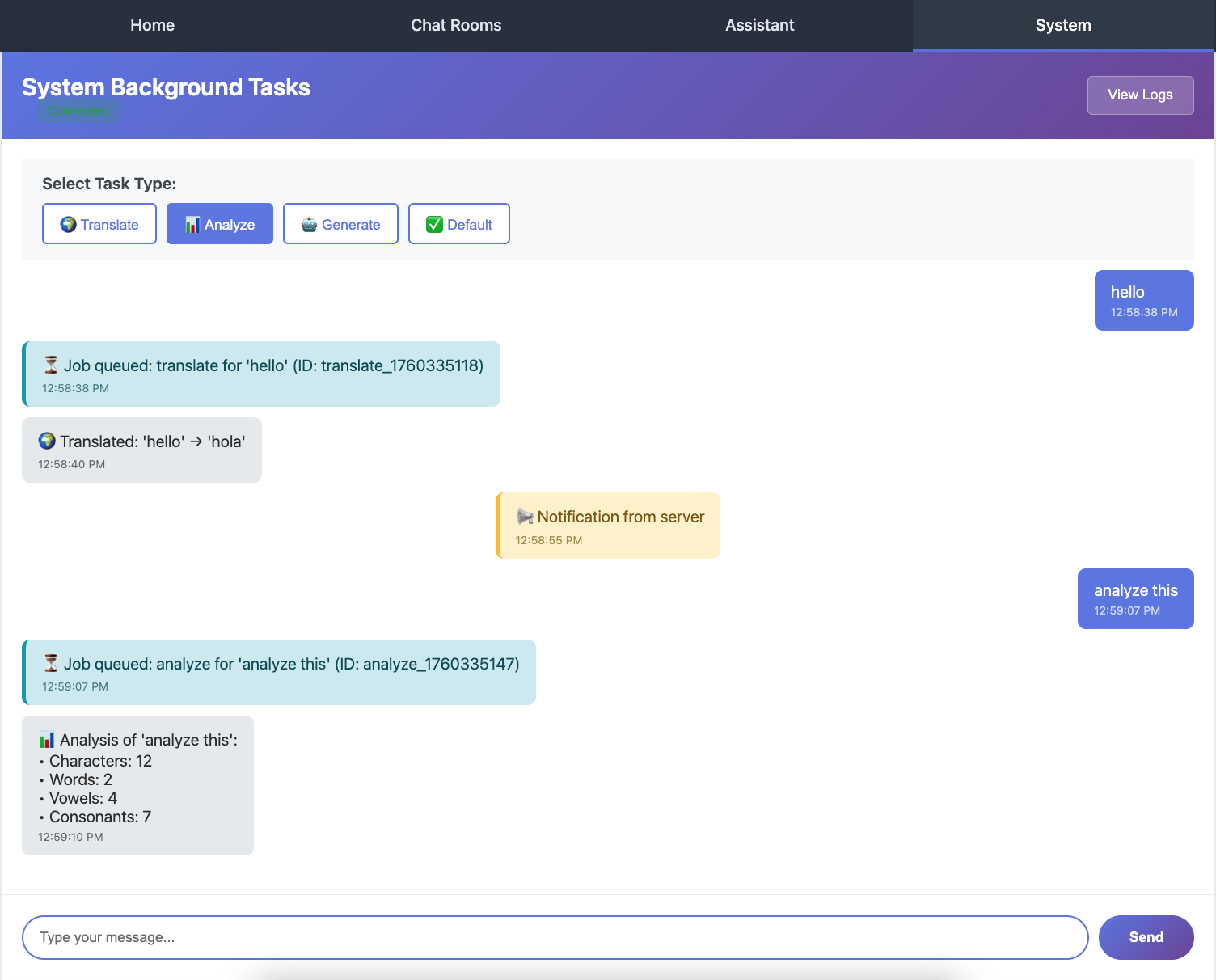
Example showing: translate task result, analyze task result, and a system notification broadcast
Try with repeat:
python chanx_django/manage.py send_notification "Server restart in" --repeat 3 --interval 2
6. View AsyncAPI Documentation:
Visit http://localhost:8000/asyncapi/docs/ - you'll see all message types documented, including event handlers!
Key Concepts
Channel Layer Methods:
# Send to specific channel
await Consumer.send_event(message, channel_name)        # Async
Consumer.send_event_sync(message, channel_name)         # Sync

# Broadcast to all in group
await Consumer.broadcast_event(message)                 # Async
Consumer.broadcast_event_sync(message)                  # Sync
Event Handlers:
Use
@event_handler- handles messages from channel layer (not WebSocket)Routing via message type annotation (like
@ws_handler)Return the event to forward it to the client
Celery + WebSocket Flow:
Client sends message → Queue Celery task → Send "Job Queued" acknowledgment
Celery worker completes →
send_event_sync()to specific channel → Client receives resultManagement command →
broadcast_event_sync()→ All connected clients receive notification
Quick Reference
WebSocket → Celery → WebSocket:
# WebSocket handler: Queue task
task_func.delay(data, self.channel_name)

# Celery task: Send result back
Consumer.send_event_sync(Result(result), channel_name)

# Event handler: Forward to client
@event_handler
async def handle_result(self, event: Result) -> Result:
    return event
System-Wide Broadcast:
Consumer.broadcast_event_sync(Notification(payload="msg"))  # Sync
await Consumer.broadcast_event(Notification(payload="msg"))  # Async
Auto-Join Groups:
class MyConsumer(AsyncJsonWebsocketConsumer):
    groups = ["notifications", "updates"]
What's Next?
Congratulations! You've built a complete background task processing system with:
✅ Celery integration for background tasks
✅ Real-time task result notifications
✅ Event handlers for channel layer communication
✅ System-wide broadcasting
✅ Management commands sending WebSocket messages
✅ Development script for running multiple services
The code at this point matches the cp4 branch:
git checkout cp4
In the next part, you'll add comprehensive integration tests for all WebSocket endpoints, learning:
Testing WebSocket consumers
Testing event handlers
Testing Celery task integration
Using Chanx testing utilities