Part 3: Assistants WebSocket
In this part, you'll build an AI-powered chat assistant with streaming responses. This section demonstrates more advanced Chanx features:
Using the
@channeldecorator for consumer metadataServer-initiated messages (sending without receiving first)
Streaming responses with multiple message types
Stateful consumers with conversation history
Integrating external services (OpenAI API)
Union types for multiple output messages
By the end, you'll have a working AI assistant that responds to user messages with streaming text, just like ChatGPT.
Starting Point
Make sure you've completed Part 2. If you want to start fresh from checkpoint 2:
git checkout cp2
git reset --hard
Understanding Streaming Responses
Unlike the chat app where messages flow client → server → other clients, the assistants app uses streaming:
Client sends a message: "What is Python?"
Server sends "streaming_start" signal
Server sends multiple "streaming" chunks: "Python", " is", " a", " programming", " language..."
Server sends "complete_streaming" signal
The client receives and displays tokens as they arrive, creating a smooth typing effect.
Step 1: Install Dependencies
The assistants app uses LangChain to interact with OpenAI's API.
uv add langchain langchain-openai
This installs:
langchain- Framework for building LLM applicationslangchain-openai- OpenAI integration for LangChain
Step 2: Configure OpenAI API Key
Before writing code, let's set up the OpenAI API key as a prerequisite.
1. Add Django Settings:
Edit chanx_django/config/settings/base.py and add at the end:
# =========================================================================
# AI CONFIGURATION
# =========================================================================

OPENAI_API_KEY = env.str("OPENAI_API_KEY", "")
OPENAI_ORG = env.str("OPENAI_ORG", "")
2. Create .env File:
Create a .env file in the project root (same directory as docker-compose.yml):
touch .env
3. Add API Keys to .env:
Open the .env file and add your OpenAI credentials:
# OpenAI Configuration
OPENAI_API_KEY=your-actual-api-key-here
OPENAI_ORG=  # Optional - leave empty if you don't have an organization
Replace your-actual-api-key-here with your OpenAI API key.
To get an OpenAI API key:
Sign in or create an account
Click "Create new secret key"
Copy the key and paste it in your
.envfile
Note
The OPENAI_ORG setting is optional. You can leave it empty unless your API key is associated with a specific OpenAI organization.
Warning
Never commit your `.env` file to Git! The .gitignore file should already include .env to prevent accidentally committing sensitive data.
Step 3: Define Message Types
We need four message types: one incoming and three outgoing.
Create chanx_django/assistants/messages.py:
from typing import Literal

from chanx.messages.base import BaseMessage
from pydantic import BaseModel


class StreamingPayload(BaseModel):
    """Payload for streaming messages."""

    content: str


# Incoming messages (Client → WebSocket)
class AssistantMessage(BaseMessage):
    """User message to the assistant."""

    action: Literal["assistant_message"] = "assistant_message"
    payload: str


# Outgoing messages (WebSocket → Client)
class StreamingStartMessage(BaseMessage):
    """Signal that streaming is starting."""

    action: Literal["streaming_start"] = "streaming_start"
    payload: StreamingPayload


class StreamingMessage(BaseMessage):
    """Streaming message chunk from assistant."""

    action: Literal["streaming"] = "streaming"
    payload: StreamingPayload


class CompleteStreamingMessage(BaseMessage):
    """Signal that streaming is complete."""

    action: Literal["complete_streaming"] = "complete_streaming"
    payload: StreamingPayload
Key differences from chat messages:
AssistantMessage: Payload is just a string (simpler than chat which had name + message)
Three outgoing types: Start, streaming chunks, and completion signal
Shared payload: All outgoing messages use
StreamingPayload
Step 4: Create AI Service
Now let's create the service that communicates with OpenAI.
Create directory assistants/services/:
mkdir -p chanx_django/assistants/services
touch chanx_django/assistants/services/__init__.py
Create chanx_django/assistants/services/ai_service.py:
from collections.abc import Iterator
from typing import TypedDict

from django.conf import settings
from langchain_core.messages import AIMessage, BaseMessage, HumanMessage
from langchain_openai import ChatOpenAI
from pydantic import SecretStr


class ConversationMessage(TypedDict):
    """Type definition for conversation history messages."""

    role: str
    content: str


class OpenAIService:
    """OpenAI backend using LangChain."""

    def __init__(self, model: str = "gpt-4o", temperature: float = 0.7):
        """Initialize OpenAI backend.

        Args:
            model: OpenAI model to use
            temperature: Temperature for response generation
        """

        self.llm = ChatOpenAI(
            model=model,
            temperature=temperature,
            api_key=SecretStr(getattr(settings, "OPENAI_API_KEY", "")),
            organization=getattr(settings, "OPENAI_ORG", None),
            streaming=True,
        )

    def format_messages(
        self, message: str, conversation_history: list[ConversationMessage]
    ) -> list[BaseMessage]:
        """Format conversation history into LangChain messages.

        Args:
            message: Current user message
            conversation_history: Previous conversation messages

        Returns:
            List of formatted LangChain messages
        """
        messages: list[BaseMessage] = []

        # Add conversation history
        for msg in conversation_history:
            if msg.get("role") == "user":
                messages.append(HumanMessage(content=msg["content"]))
            else:
                messages.append(AIMessage(content=msg["content"]))

        # Add current message
        messages.append(HumanMessage(content=message))

        return messages

    def generate_stream(
        self, message: str, conversation_history: list[ConversationMessage]
    ) -> Iterator[str]:
        """Generate streaming response from OpenAI.

        Args:
            message: User message
            conversation_history: Previous conversation messages

        Yields:
            Tokens from the AI response
        """
        messages = self.format_messages(message, conversation_history)

        # Stream the response
        for chunk in self.llm.stream(messages):
            yield chunk.text()
What this service does:
ConversationMessage: TypedDict for type-safe conversation history
OpenAIService: Wrapper around LangChain's ChatOpenAI
__init__: Configures the model with API key from settingsformat_messages: Converts conversation history to LangChain formatgenerate_stream: Yields tokens from the AI response
Note
The streaming=True parameter in ChatOpenAI enables token-by-token streaming instead of waiting for the complete response.
Step 5: Create the WebSocket Consumer
Now create the consumer that uses the AI service and handles streaming.
Create chanx_django/assistants/conversation_consumer.py:
from typing import Any

from chanx.channels.websocket import AsyncJsonWebsocketConsumer
from chanx.core.decorators import channel, ws_handler
from chanx.messages.incoming import PingMessage
from chanx.messages.outgoing import PongMessage

from assistants.messages import (
    AssistantMessage,
    CompleteStreamingMessage,
    StreamingMessage,
    StreamingPayload,
    StreamingStartMessage,
)
from assistants.services.ai_service import ConversationMessage, OpenAIService


@channel(
    name="assistants", description="AI Assistant WebSocket API", tags=["ai", "chat"]
)
class ConversationAssistantConsumer(AsyncJsonWebsocketConsumer):
    """WebSocket consumer for AI assistant chat."""

    def __init__(self, *args: Any, **kwargs: Any):
        super().__init__(*args, **kwargs)
        self.conversation_history: list[ConversationMessage] = []

    @ws_handler(
        summary="Handle ping requests",
        description="Simple ping-pong for connectivity testing",
    )
    async def handle_ping(self, _message: PingMessage) -> PongMessage:
        return PongMessage()

    @ws_handler(
        summary="Handle user message",
        description="Process user message and generate AI response",
        output_type=StreamingStartMessage | StreamingMessage | CompleteStreamingMessage,
    )
    async def handle_assistant_message(self, message: AssistantMessage) -> None:
        """Handle incoming user message and generate AI response with streaming."""

        ai_service = OpenAIService()

        # Add user message to history
        self.conversation_history.append({"role": "user", "content": message.payload})

        # Send streaming start signal
        await self.send_message(
            StreamingStartMessage(payload=StreamingPayload(content=""))
        )

        # Generate streaming response
        complete_response = ""
        for token in ai_service.generate_stream(
            message.payload, self.conversation_history[:-1]  # Exclude current message
        ):
            complete_response += token
            # Send streaming chunk
            await self.send_message(
                StreamingMessage(payload=StreamingPayload(content=token))
            )

        # Add assistant response to history
        self.conversation_history.append(
            {"role": "assistant", "content": complete_response}
        )

        # Send completion signal
        await self.send_message(
            CompleteStreamingMessage(payload=StreamingPayload(content=""))
        )
Let's break this down:
1. The @channel Decorator:
@channel(
    name="assistants", description="AI Assistant WebSocket API", tags=["ai", "chat"]
)
The @channel decorator adds metadata to the consumer:
name: Custom name for AsyncAPI documentationdescription: Describes what this WebSocket endpoint doestags: Categorizes the endpoint (useful for organizing docs)
This metadata appears in the auto-generated AsyncAPI documentation.
2. Stateful Consumer:
def __init__(self, *args: Any, **kwargs: Any):
    super().__init__(*args, **kwargs)
    self.conversation_history: list[ConversationMessage] = []
Unlike the stateless chat consumer, this stores conversation history per connection. Each WebSocket connection maintains its own chat context.
3. Enhanced @ws_handler:
@ws_handler(
    summary="Handle user message",
    description="Process user message and generate AI response",
    output_type=StreamingStartMessage | StreamingMessage | CompleteStreamingMessage,
)
The decorator now includes:
summary: Brief description (appears in AsyncAPI docs)description: Detailed explanationoutput_type: Union type using|operator - tells Chanx this handler can send any of these three message types
4. Streaming Handler:
async def handle_assistant_message(self, message: AssistantMessage) -> None:
    ai_service = OpenAIService()

    # Add user message to history
    self.conversation_history.append({"role": "user", "content": message.payload})

    # Send streaming start signal
    await self.send_message(
        StreamingStartMessage(payload=StreamingPayload(content=""))
    )

    # Generate streaming response
    complete_response = ""
    for token in ai_service.generate_stream(
        message.payload, self.conversation_history[:-1]
    ):
        complete_response += token
        # Send streaming chunk
        await self.send_message(
            StreamingMessage(payload=StreamingPayload(content=token))
        )

    # Add assistant response to history
    self.conversation_history.append(
        {"role": "assistant", "content": complete_response}
    )

    # Send completion signal
    await self.send_message(
        CompleteStreamingMessage(payload=StreamingPayload(content=""))
    )
The flow:
Store user message in history
Signal streaming start
Loop through AI-generated tokens, sending each one immediately
Store complete AI response in history
Signal streaming complete
Tip
We pass self.conversation_history[:-1] to exclude the current message because we already append it to the list and pass it as the message parameter.
Step 6: Create Routing
Create chanx_django/assistants/routing.py:
from channels.routing import URLRouter
from chanx.channels.routing import path

from assistants.conversation_consumer import ConversationAssistantConsumer

router = URLRouter(
    [
        path("", ConversationAssistantConsumer.as_asgi()),
    ]
)
Unlike the chat app, we don't need URL parameters. The URL is simply /ws/assistants/.
Step 7: Enable Assistants Routing
Edit chanx_django/config/routing.py and uncomment the assistants line:
from channels.routing import URLRouter
from chanx.channels.routing import include, path

ws_router = URLRouter(
    [
        path("chat/", include("chat.routing")),
        path("assistants/", include("assistants.routing")),  # Uncomment this
        # path("system/", include("system.routing")),
    ]
)

router = URLRouter(
    [
        path("ws/", include(ws_router)),
    ]
)
Testing the Assistant
1. Start the Development Server:
python chanx_django/manage.py runserver
2. Open the Assistants Page:
Visit http://localhost:8000/assistants/
3. Send a Message:
Type a message like "What is Python?" and press Enter or click Send.
4. Watch the Streaming Response:
You should see:
The AI response appears word by word or token by token
Text flows smoothly like typing
Each token is sent as a separate WebSocket message
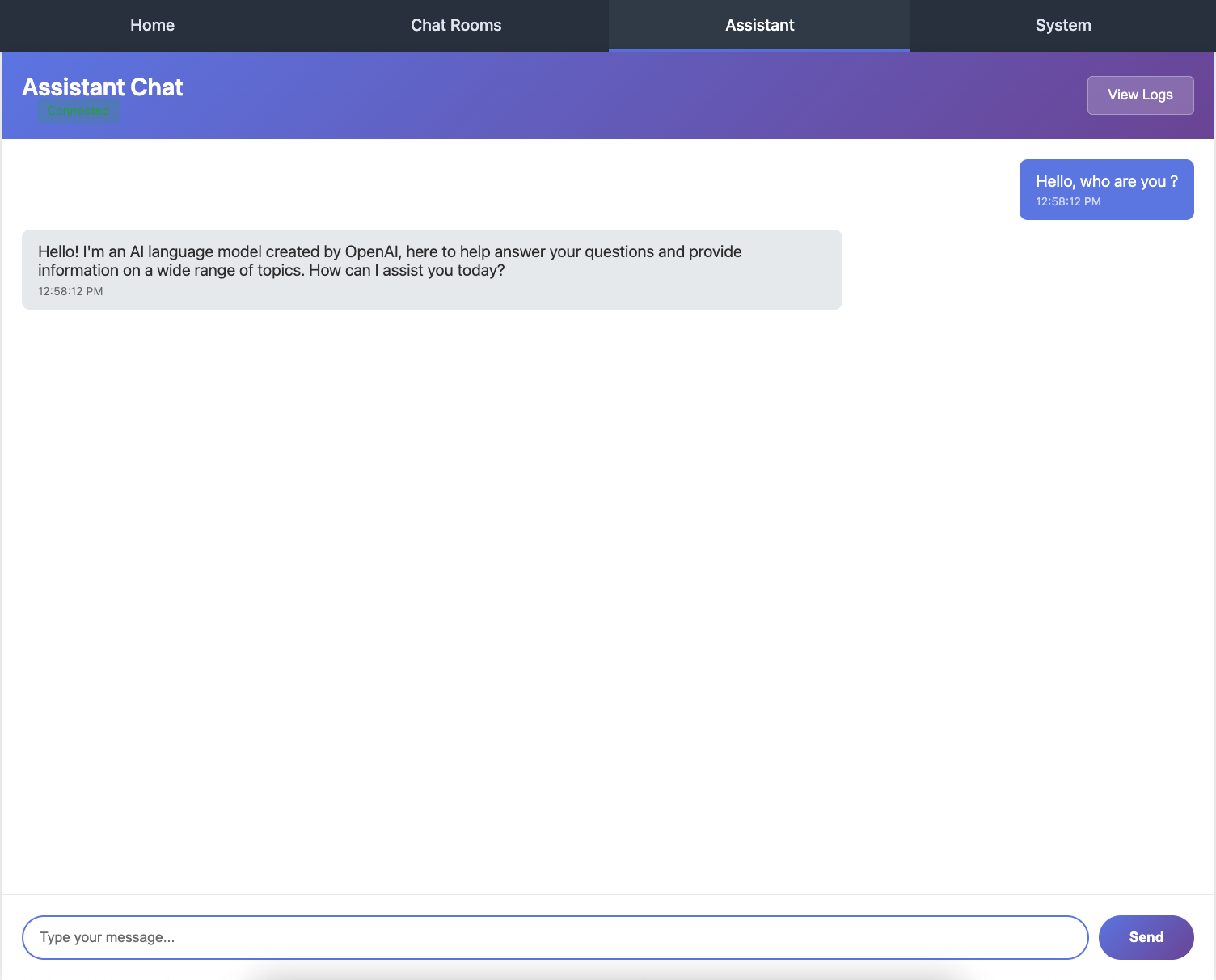
The complete response as displayed to the user
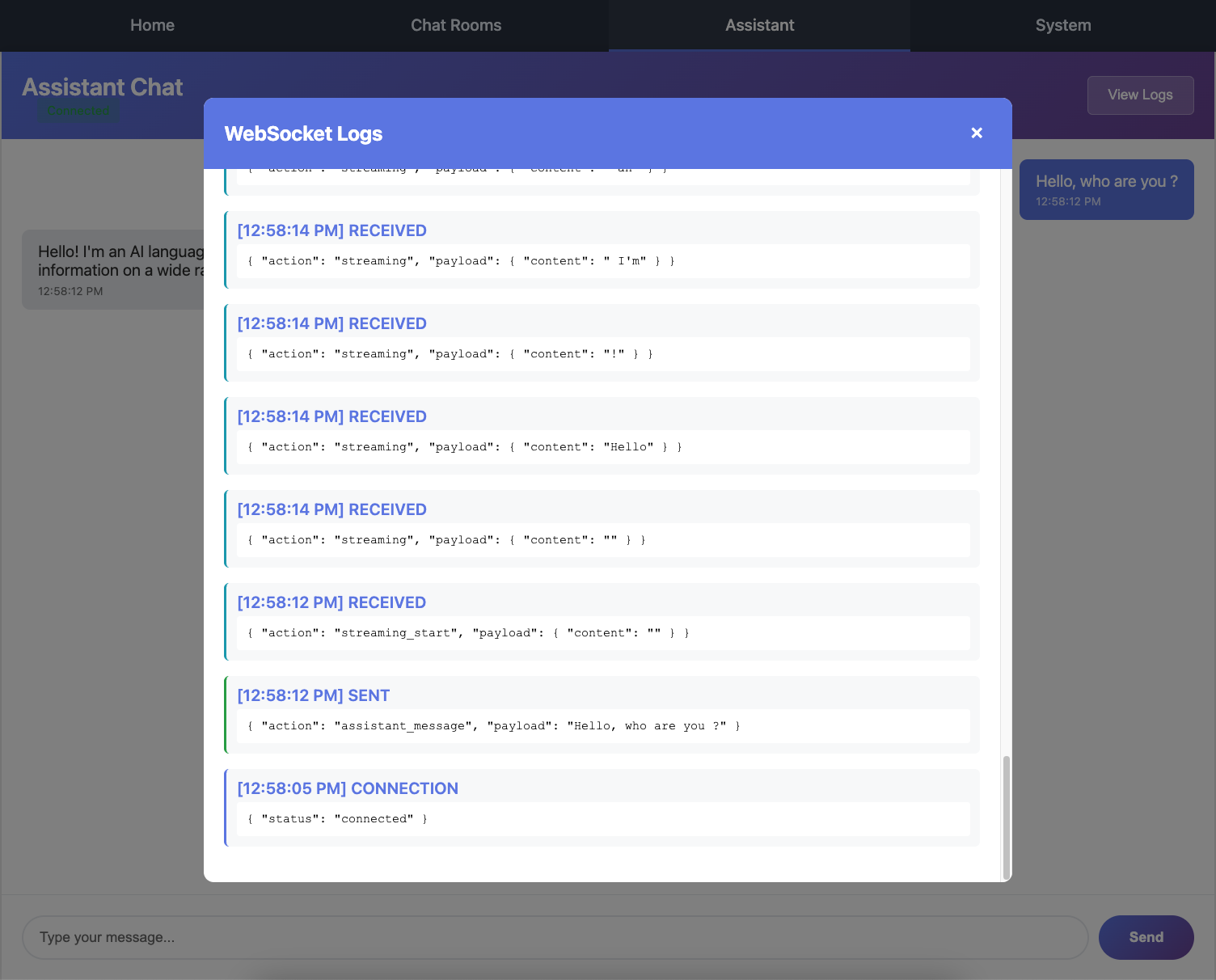
Browser console showing the multiple streaming messages received (streaming_start, streaming chunks, complete_streaming)
5. Continue the Conversation:
Send follow-up messages like "Can you give me an example?". The assistant remembers the conversation context!
6. View AsyncAPI Documentation:
Visit http://localhost:8000/asyncapi/docs/ and notice:
The
@channeldecorator's metadata is shownAll four message types are documented
The
summaryanddescriptionfrom@ws_handlerappearThe union output type shows all three possible response messages
Understanding Server-Initiated Messages
This is a key difference from the chat app:
Chat App (Request-Response):
Client sends NewChatMessage
→ Server broadcasts NewChatMessage to group
Assistants App (Server-Initiated Streaming):
Client sends AssistantMessage
→ Server sends StreamingStartMessage (no client request)
→ Server sends StreamingMessage (no client request)
→ Server sends StreamingMessage (no client request)
→ ... more chunks ...
→ Server sends CompleteStreamingMessage (no client request)
The server sends multiple messages in response to a single client message. This is perfect for:
Streaming AI responses
Progress updates for long operations
Real-time notifications
Multi-step workflows
Conversation State Management
The consumer maintains conversation history per connection:
def __init__(self, *args: Any, **kwargs: Any):
    super().__init__(*args, **kwargs)
    self.conversation_history: list[ConversationMessage] = []
Important behaviors:
Each WebSocket connection has its own history
History persists for the lifetime of the connection
When the connection closes, history is lost
Different browser tabs = different conversations
For production, you'd typically:
Store conversation history in a database
Load history when connection opens
Save new messages to the database
Associate conversations with user accounts
Advanced Concepts
Union Types for Output:
output_type=StreamingStartMessage | StreamingMessage | CompleteStreamingMessage
This tells Chanx (and AsyncAPI docs) that this handler can send any of these three types. The | operator creates a union type.
Type-Safe History:
self.conversation_history: list[ConversationMessage] = []
Using TypedDict provides type safety for conversation messages without the overhead of Pydantic models.
Iterator Pattern:
def generate_stream(self, ...) -> Iterator[str]:
    for chunk in self.llm.stream(messages):
        yield chunk.text()
The service yields tokens one at a time, allowing the consumer to send them immediately rather than waiting for the complete response.
Common Patterns
Pattern 1: Send Multiple Message Types
@ws_handler(output_type=MessageA | MessageB | MessageC)
async def handler(self, message: InputMessage) -> None:
    await self.send_message(MessageA(...))
    await self.send_message(MessageB(...))
    await self.send_message(MessageC(...))
Pattern 2: Streaming Data
for chunk in data_source:
    await self.send_message(ChunkMessage(payload=chunk))
Pattern 3: Progress Updates
await self.send_message(ProgressMessage(payload={"percent": 0}))
# ... do work ...
await self.send_message(ProgressMessage(payload={"percent": 50}))
# ... do more work ...
await self.send_message(ProgressMessage(payload={"percent": 100}))
Pattern 4: Stateful Consumer
def __init__(self, *args: Any, **kwargs: Any):
    super().__init__(*args, **kwargs)
    self.state = {}  # Per-connection state
What's Next?
Excellent work! You've built an AI assistant with:
✅ Streaming responses with multiple message types
✅ Server-initiated messages
✅ Stateful consumers with conversation history
✅ External service integration (OpenAI)
✅ Enhanced AsyncAPI documentation with metadata
✅ Union types for flexible output
The code at this point matches the cp3 branch:
git checkout cp3
In the next part, you'll build a notification system that demonstrates:
Channel layer events for server-to-server communication
Broadcasting to specific users across different consumers
Event handlers with
@event_handlerSystem-wide notifications