Part 4: Multi-Layer WebSocket Showcase
In this part, you'll explore how multiple channel layer types work together in one application. This demonstrates:
Using different channel layer types for different purposes
External scripts sending WebSocket messages
Broadcasting to multiple consumer groups
Choosing the right layer for your use case
Starting Point
Make sure you've completed Part 3. If you want to start fresh from checkpoint 3:
git checkout cp3
git reset --hard
Understanding Multi-Layer Architecture
We configured five channel layers in Part 2 (src/layers.py). Now we'll use four of them simultaneously:
Layer |
Type |
Use Case |
Consumer |
|---|---|---|---|
|
RedisPubSub |
Real-time chat |
ChatConsumer |
|
Redis (Queue) |
Reliable messaging |
ReliableChatConsumer |
|
RedisPubSub |
Push notifications |
NotificationConsumer |
|
Redis (Queue) |
Event tracking |
AnalyticsConsumer |
Why use different layers?
Pub/Sub (
RedisPubSubChannelLayer) - Fast, real-time, no message persistenceQueue (
RedisChannelLayer) - Reliable, messages queued with expiry, guaranteed delivery
Step 1: Define Message Types
Create the app directory and init file:
mkdir -p src/apps/showcase
touch src/apps/showcase/__init__.py
Create src/apps/showcase/messages.py:
"""
Message types for the showcase consumers.
"""

from typing import Any, Literal

from chanx.messages.base import BaseMessage
from pydantic import BaseModel


# Chat messages
class ChatPayload(BaseModel):
    message: str


class ChatMessage(BaseMessage):
    action: Literal["chat"] = "chat"
    payload: ChatPayload


class ChatNotificationMessage(BaseMessage):
    action: Literal["chat_notification"] = "chat_notification"
    payload: ChatPayload


# Reliable chat messages
class ReliableChatPayload(BaseModel):
    message: str


class ReliableChatMessage(BaseMessage):
    action: Literal["reliable_chat"] = "reliable_chat"
    payload: ReliableChatPayload


class ReliableChatNotificationMessage(BaseMessage):
    action: Literal["reliable_chat_notification"] = "reliable_chat_notification"
    payload: ReliableChatPayload


# Notification messages
class NotificationPayload(BaseModel):
    type: str = "user"
    message: str


class NotificationMessage(BaseMessage):
    action: Literal["notification"] = "notification"
    payload: NotificationPayload


class NotificationBroadcastMessage(BaseMessage):
    action: Literal["notification_broadcast"] = "notification_broadcast"
    payload: NotificationPayload


# Analytics messages
class AnalyticsPayload(BaseModel):
    event: str
    data: Any = None


class AnalyticsMessage(BaseMessage):
    action: Literal["analytics"] = "analytics"
    payload: AnalyticsPayload


class AnalyticsNotificationMessage(BaseMessage):
    action: Literal["analytics_notification"] = "analytics_notification"
    payload: AnalyticsPayload


# External event messages
class SystemNotify(BaseMessage):
    action: Literal["system_notify"] = "system_notify"
    payload: str


class SystemPeriodicNotify(BaseMessage):
    action: Literal["system_periodic_notify"] = "system_periodic_notify"
    payload: str
Each consumer has its own message types, plus two shared event types (SystemNotify, SystemPeriodicNotify) for external messaging.
Step 2: Create Showcase Consumers
Create src/apps/showcase/consumer.py with four consumers:
"""
Showcase Consumers - Different channel layer types working together.
"""

from chanx.core.decorators import channel, event_handler, ws_handler
from chanx.messages.incoming import PingMessage
from chanx.messages.outgoing import PongMessage
from fast_channels.type_defs import WebSocketDisconnectEvent

from src.base_consumer import BaseConsumer

from .messages import (
    AnalyticsMessage,
    AnalyticsNotificationMessage,
    AnalyticsPayload,
    ChatMessage,
    ChatNotificationMessage,
    ChatPayload,
    NotificationBroadcastMessage,
    NotificationMessage,
    NotificationPayload,
    ReliableChatMessage,
    ReliableChatNotificationMessage,
    ReliableChatPayload,
    SystemNotify,
    SystemPeriodicNotify,
)


@channel(
    name="chat",
    description="Basic Chat Consumer using centralized chat layer",
    tags=["chat", "showcase"],
)
class ChatConsumer(BaseConsumer[SystemNotify]):
    """Chat consumer using the centralized chat layer."""

    groups = ["chat_room"]
    channel_layer_alias = "chat"

    @ws_handler(
        summary="Handle ping requests",
        description="Simple ping-pong for connectivity testing",
    )
    async def handle_ping(self, _message: PingMessage) -> PongMessage:
        return PongMessage()

    @ws_handler(
        summary="Handle chat messages",
        description="Process chat messages and broadcast to room",
        output_type=ChatNotificationMessage,
    )
    async def handle_chat(self, message: ChatMessage) -> None:
        await self.broadcast_message(
            ChatNotificationMessage(
                payload=ChatPayload(message=f"💬 {message.payload.message}"),
            ),
        )

    async def post_authentication(self) -> None:
        await self.broadcast_message(
            ChatNotificationMessage(
                payload=ChatPayload(message="📢 Someone joined the chat")
            ),
        )

    async def websocket_disconnect(self, message: WebSocketDisconnectEvent) -> None:
        await self.broadcast_message(
            ChatNotificationMessage(
                payload=ChatPayload(message="❌ Someone left the chat.")
            ),
        )
        await super().websocket_disconnect(message)

    @event_handler
    async def system_notify_chat(self, event: SystemNotify) -> ChatNotificationMessage:
        return ChatNotificationMessage(
            payload=ChatPayload(message=event.payload),
        )


@channel(
    name="reliable_chat",
    description="Reliable Chat Consumer using queue-based layer",
    tags=["chat", "reliable", "showcase"],
)
class ReliableChatConsumer(BaseConsumer[SystemNotify]):
    """Chat consumer using queue-based layer for guaranteed delivery."""

    channel_layer_alias = "queue"
    groups = ["reliable_chat"]

    @ws_handler(
        summary="Handle ping requests",
        description="Simple ping-pong for connectivity testing",
    )
    async def handle_ping(self, _message: PingMessage) -> PongMessage:
        return PongMessage()

    @ws_handler(
        summary="Handle reliable chat messages",
        description="Process reliable chat messages with guaranteed delivery",
        output_type=ReliableChatNotificationMessage,
    )
    async def handle_reliable_chat(self, message: ReliableChatMessage) -> None:
        await self.broadcast_message(
            ReliableChatNotificationMessage(
                payload=ReliableChatPayload(message=f"📨 {message.payload.message}")
            ),
            groups=["reliable_chat"],
        )

    async def post_authentication(self) -> None:
        await self.broadcast_message(
            ReliableChatNotificationMessage(
                payload=ReliableChatPayload(
                    message="🔒 Reliable chat connection established!"
                )
            ),
            groups=["reliable_chat"],
        )

    async def websocket_disconnect(self, message: WebSocketDisconnectEvent) -> None:
        await self.broadcast_message(
            ReliableChatNotificationMessage(
                payload=ReliableChatPayload(message="🚪 Left reliable chat!")
            ),
            groups=["reliable_chat"],
        )
        await super().websocket_disconnect(message)

    @event_handler
    async def system_notify_chat(self, event: SystemNotify) -> ChatNotificationMessage:
        return ChatNotificationMessage(
            payload=ChatPayload(message=event.payload),
        )


@channel(
    name="notifications",
    description="Notification Consumer for real-time notifications",
    tags=["notifications", "showcase"],
)
class NotificationConsumer(BaseConsumer):
    """Consumer for real-time notifications."""

    channel_layer_alias = "notifications"
    groups = ["notifications"]

    @ws_handler(
        summary="Handle ping requests",
        description="Simple ping-pong for connectivity testing",
    )
    async def handle_ping(self, _message: PingMessage) -> PongMessage:
        return PongMessage()

    @ws_handler(
        summary="Handle notification messages",
        description="Process notification messages and broadcast to all clients",
        output_type=NotificationBroadcastMessage,
    )
    async def handle_notification(self, message: NotificationMessage) -> None:
        await self.broadcast_message(
            NotificationBroadcastMessage(
                payload=NotificationPayload(
                    type="user",
                    message=f"🔔 Notification: {message.payload.message}",
                )
            ),
        )

    async def post_authentication(self) -> None:
        await self.broadcast_message(
            NotificationBroadcastMessage(
                payload=NotificationPayload(
                    type="system", message="🔔 Connected to notifications!"
                )
            ),
        )

    @event_handler
    async def system_notify_notification(
        self, event: SystemNotify
    ) -> NotificationBroadcastMessage:
        return NotificationBroadcastMessage(
            payload=NotificationPayload(type="system", message=event.payload)
        )

    @event_handler
    async def system_notify_periodic_notification(
        self, event: SystemPeriodicNotify
    ) -> NotificationBroadcastMessage:
        return NotificationBroadcastMessage(
            payload=NotificationPayload(type="periodic", message=event.payload)
        )


@channel(
    name="analytics",
    description="Analytics Consumer for reliable event delivery",
    tags=["analytics", "showcase"],
)
class AnalyticsConsumer(BaseConsumer[SystemNotify]):
    """Consumer for analytics events with reliable delivery."""

    channel_layer_alias = "analytics"
    groups = ["analytics"]

    @ws_handler(
        summary="Handle ping requests",
        description="Simple ping-pong for connectivity testing",
    )
    async def handle_ping(self, _message: PingMessage) -> PongMessage:
        return PongMessage()

    @ws_handler(
        summary="Handle analytics events",
        description="Process analytics events with reliable delivery",
        output_type=AnalyticsNotificationMessage,
    )
    async def handle_analytics(self, message: AnalyticsMessage) -> None:
        await self.broadcast_message(
            AnalyticsNotificationMessage(
                payload=AnalyticsPayload(
                    event=f"📊 Analytics: {message.payload.event}",
                    data=message.payload.data,
                )
            ),
        )

    @event_handler
    async def system_notify_analytic(
        self, event: SystemNotify
    ) -> AnalyticsNotificationMessage:
        return AnalyticsNotificationMessage(
            payload=AnalyticsPayload(
                event=f"{event.payload}",
            )
        )
Key points:
Each consumer uses a different channel layer (channel_layer_alias):
ChatConsumer:
"chat"layer (Pub/Sub)ReliableChatConsumer:
"queue"layer (Queue-based)NotificationConsumer:
"notifications"layer (Pub/Sub)AnalyticsConsumer:
"analytics"layer (Queue-based)
All consumers have event handlers to receive external messages (SystemNotify events).
Step 3: Create External Sender Script
This script demonstrates sending messages to WebSocket clients from outside a consumer.
Create src/external_sender.py:
"""
Example of sending messages to WebSocket groups from outside a consumer.
"""

import asyncio

from fast_channels.layers.registry import channel_layers

from src.apps.showcase.consumer import (
    AnalyticsConsumer,
    ChatConsumer,
    NotificationConsumer,
    ReliableChatConsumer,
)
from src.apps.showcase.messages import SystemNotify, SystemPeriodicNotify
from src.layers import setup_layers

if len(channel_layers) == 0:
    setup_layers()


async def send_chat_message() -> None:
    """Send a message to the chat room using the chat layer."""
    await ChatConsumer.broadcast_event(
        SystemNotify(payload="🔔 System announcement: Welcome to the chat!")
    )

    print("✅ Chat message sent!")


async def send_reliable_message() -> None:
    """Send a message using the queue-based layer for guaranteed delivery."""
    await ReliableChatConsumer.broadcast_event(
        SystemNotify(payload="🔒 Important: System maintenance scheduled for tonight"),
    )

    print("✅ Reliable message sent!")


async def send_notification() -> None:
    """Send a notification using the notifications layer."""
    await NotificationConsumer.broadcast_event(
        SystemNotify(payload="🚨 Alert: High CPU usage detected on server")
    )

    print("✅ Notification sent!")


async def send_analytics_event() -> None:
    """Send analytics events using the analytics layer."""
    events = [
        "user_login:john_doe",
        "page_view:/dashboard",
        "button_click:export_data",
        "session_duration:1234",
        "error:api_timeout",
    ]

    for event in events:
        await AnalyticsConsumer.broadcast_event(
            SystemNotify(payload=event),
        )
        await asyncio.sleep(0.1)

    print(f"✅ Sent {len(events)} analytics events!")


async def periodic_announcements() -> None:
    """Send periodic announcements to different channels."""
    print("⏰ Starting periodic announcements...")
    for i in range(3):
        if i % 2 == 0:
            message = f"⏰ Hourly chat announcement #{i+1}"
            await ChatConsumer.broadcast_event(
                SystemNotify(payload=message),
            )
        else:
            message = f"🔔 System status update #{i+1}"
            await NotificationConsumer.broadcast_event(
                SystemPeriodicNotify(payload=message),
            )

        print(f"✅ Sent announcement #{i+1}")
        await asyncio.sleep(1)

    print("✅ Periodic announcements complete!")


async def main() -> None:
    """Run all external messaging examples."""
    print("=== External Messaging with Centralized Layers ===\n")

    examples = [
        ("Chat Message", send_chat_message),
        ("Reliable Message", send_reliable_message),
        ("Notification", send_notification),
        ("Analytics Events", send_analytics_event),
        ("Periodic Announcements", periodic_announcements),
    ]

    for name, func in examples:
        print(f"🎯 Running: {name}")
        try:
            await func()
        except Exception as e:
            print(f"❌ Error in {name}: {e}")
        print()
        await asyncio.sleep(0.5)

    print("=== All Examples Complete! ===")


if __name__ == "__main__":
    asyncio.run(main())
How external messaging works:
# Send to all clients in ChatConsumer's groups
await ChatConsumer.broadcast_event(
    SystemNotify(payload="Message from external script")
)

# Event handler in ChatConsumer receives and forwards to WebSocket
@event_handler
async def system_notify_chat(self, event: SystemNotify) -> ChatNotificationMessage:
    return ChatNotificationMessage(payload=ChatPayload(message=event.payload))
Use cases for external messaging:
HTTP endpoints trigger WebSocket notifications
Background scripts send periodic updates
Cron jobs broadcast scheduled messages
Monitoring systems alert connected clients
Step 4: Register Routes
Edit src/main.py and uncomment the showcase consumers:
# Uncomment:
from src.apps.showcase.consumer import (
    AnalyticsConsumer,
    ChatConsumer,
    NotificationConsumer,
    ReliableChatConsumer,
)

# ... later:
ws_router.add_websocket_route("/chat", ChatConsumer.as_asgi())
ws_router.add_websocket_route("/reliable", ReliableChatConsumer.as_asgi())
ws_router.add_websocket_route("/notifications", NotificationConsumer.as_asgi())
ws_router.add_websocket_route("/analytics", AnalyticsConsumer.as_asgi())
Step 5: Test Multi-Layer System
1. Start Redis:
docker compose up -d
2. Start the server:
uvicorn src.main:app --reload
3. Open the showcase page:
Visit http://localhost:8000 and navigate to the Showcase page. The page connects to all four consumers simultaneously, displaying messages from each in a unified interface:
Reliable - Queue-based chat messages
Chat - Pub/Sub chat messages
Notification - Real-time notifications
Analytics - Analytics events
4. Test messaging:
Type a message and click Send. You'll see responses from:
Chat - Echo from the Pub/Sub chat layer
Reliable - Echo from the queue-based reliable chat layer
The Notification and Analytics consumers don't echo user messages - they only respond to external events (which we'll test next).
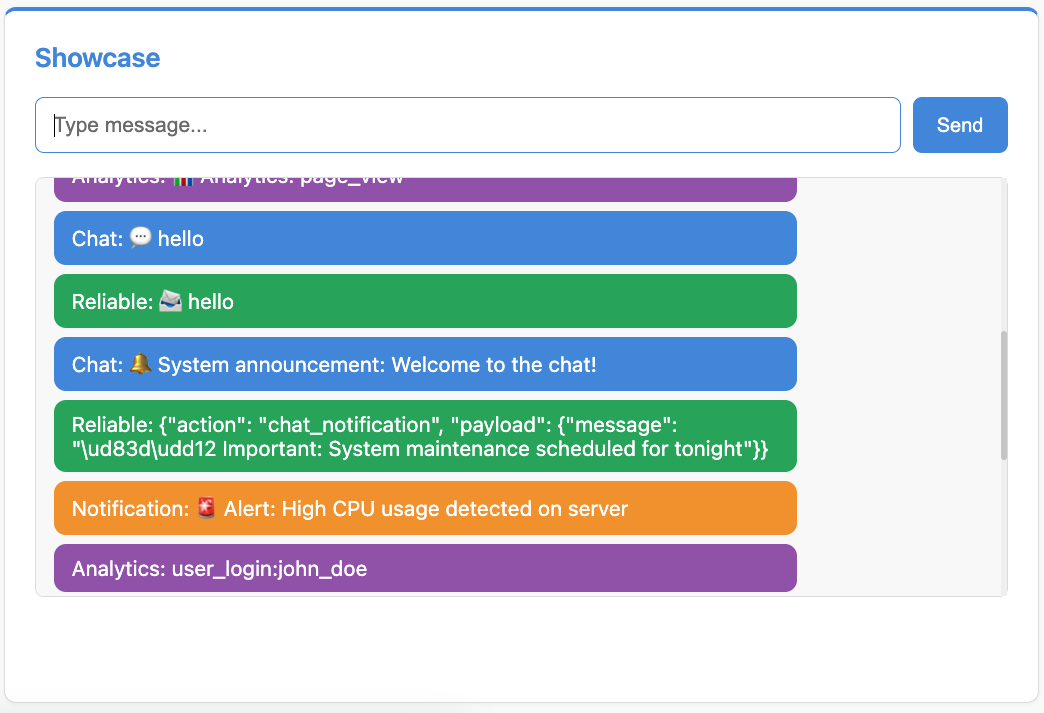
The screenshot shows the unified showcase interface with messages from Analytics, Chat, Reliable, and Notification consumers.
5. Test external messaging:
In a new terminal, run the external sender:
python -m src.external_sender
You should see messages appear in the corresponding browser tabs:
Chat tab receives: "🔔 System announcement: Welcome to the chat!"
Reliable chat tab receives: "🔒 Important: System maintenance..."
Notifications tab receives: "🚨 Alert: High CPU usage..."
Analytics tab receives multiple events
Periodic announcements alternate between chat and notifications
6. Create your own external sender:
# send_custom.py
import asyncio
from src.apps.showcase.consumer import ChatConsumer
from src.apps.showcase.messages import SystemNotify
from src.layers import setup_layers

async def main():
    setup_layers()
    await ChatConsumer.broadcast_event(
        SystemNotify(payload="Custom message!")
    )
    print("Message sent!")

asyncio.run(main())
Understanding Channel Layer Selection
When to use Pub/Sub (RedisPubSubChannelLayer):
Real-time chat
Live notifications
Ephemeral data
High message volume
Don't need persistence
When to use Queue (RedisChannelLayer):
Important messages that must be delivered
Background job results
Analytics/metrics
Messages with expiry
Need reliability over speed
Example from our showcase:
Chat (Pub/Sub) - Messages are ephemeral, speed is important
Reliable Chat (Queue) - Messages must be delivered, queued if client disconnects
Notifications (Pub/Sub) - Real-time alerts, can be missed
Analytics (Queue) - Events must not be lost, queued for processing
Viewing AsyncAPI Documentation
Now that you've built all the consumers, you can view the complete AsyncAPI documentation that Chanx automatically generates.
Visit http://localhost:8000/asyncapi/ to see your entire WebSocket API documented:
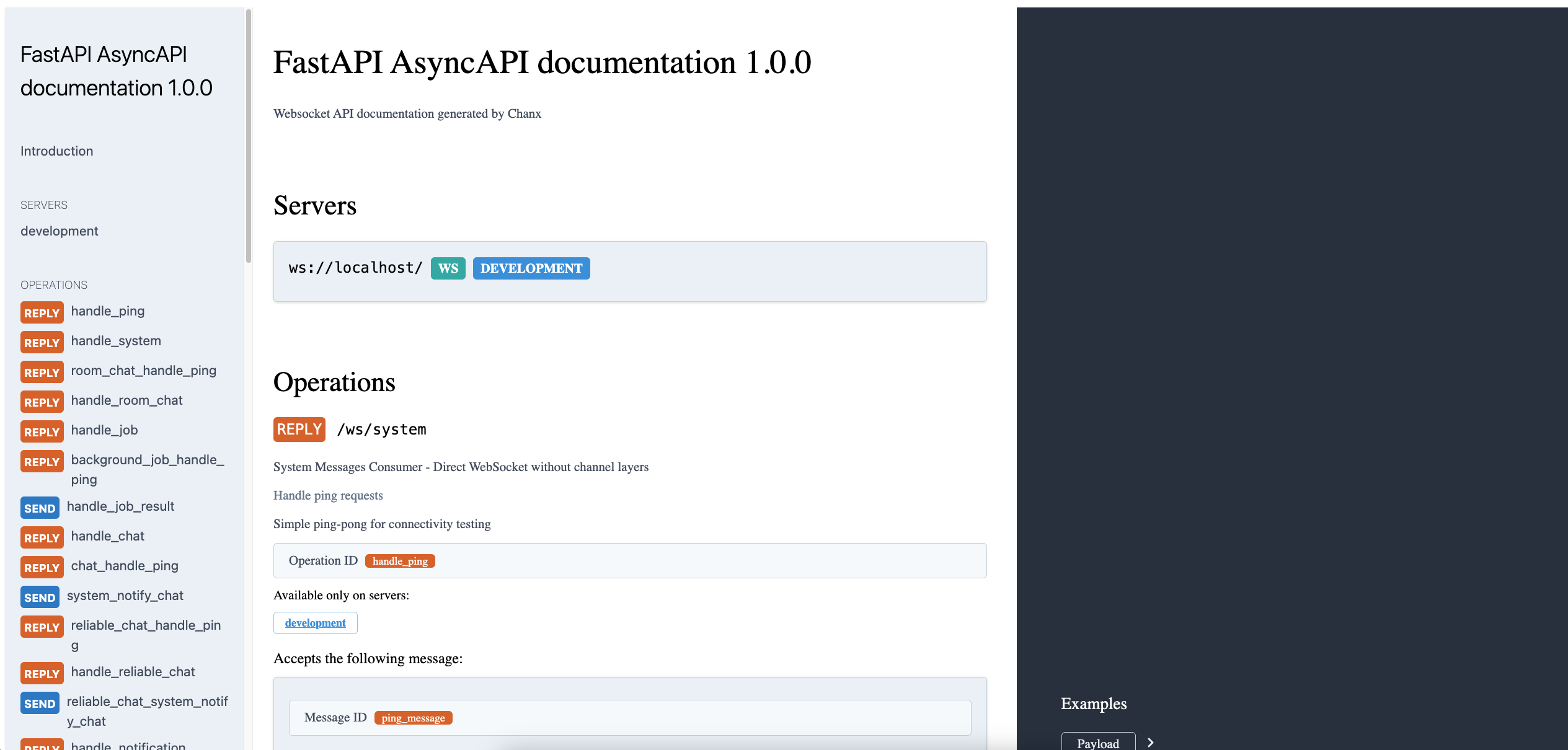
The AsyncAPI documentation automatically generates from your consumer decorators and message types, showing:
All WebSocket endpoints (
/ws/system,/ws/room/{room_name},/ws/background_jobs,/ws/chat, etc.)Available operations (handlers) for each consumer
Message schemas with Pydantic validation rules
Request and response message types
This documentation updates automatically as you add or modify consumers, keeping your API docs always in sync with your code.
Key Concepts Review
Multi-Layer Architecture:
Different consumers can use different channel layers
Each layer has specific trade-offs (speed vs reliability)
Layers are configured once in
layers.py
External Messaging:
Consumer.broadcast_event()- Send from anywhere to WebSocket clientsEvent handlers receive and forward to clients
Enables HTTP → WebSocket, scripts → WebSocket
Channel Layer Types:
Pub/Sub: Fast, real-time, no persistence
Queue: Reliable, queued, with expiry
What's Next?
You've explored the multi-layer showcase! You now understand:
✅ Using different channel layers for different purposes
✅ External scripts sending to WebSocket clients
✅ Cross-layer communication
✅ Choosing the right layer for your use case
In the final part, you'll learn comprehensive WebSocket testing with pytest.