Part 3: Background Jobs with ARQ
In this part, you'll build a background job processing system using ARQ (Async Redis Queue). This demonstrates:
Setting up ARQ workers
WebSocket → Background Task → WebSocket flow
Event handlers with
@event_handlerSending results to specific clients
Running multiple services together
Starting Point
Make sure you've completed Part 2. If you want to start fresh from checkpoint 2:
git checkout cp2
git reset --hard
Understanding Background Jobs
The background job system works as follows:
Client sends job request via WebSocket
Server queues job with ARQ and sends "queued" status
ARQ worker processes job in the background (separate process)
Worker sends result back via channel layer to specific client
WebSocket receives and forwards result to client
This architecture offloads heavy work from WebSocket connections while keeping users updated in real-time.
Step 1: Define Message Types
Create the app directory and init file:
mkdir -p src/apps/background_jobs
touch src/apps/background_jobs/__init__.py
Create src/apps/background_jobs/messages.py:
"""
Message types for the background jobs consumer.
"""

from typing import Any, Literal

from chanx.messages.base import BaseMessage
from pydantic import BaseModel


class JobPayload(BaseModel):
    type: str = "default"
    content: str


class JobMessage(BaseMessage):
    """Background job message."""

    action: Literal["job"] = "job"
    payload: JobPayload


class JobStatusMessage(BaseMessage):
    """Job status message."""

    action: Literal["job_status"] = "job_status"
    payload: dict[str, Any]


class JobResult(BaseMessage):
    """Background job message."""

    action: Literal["job_result"] = "job_result"
    payload: Any
Key points:
JobMessage- Client sends this to request a jobJobStatusMessage- Server sends status updates (queuing, queued, result, error)JobResult- Workers send this via channel layer (handled by event handler)
Step 2: Create Background Tasks
Create src/tasks.py with ARQ task definitions:
"""
ARQ-based background tasks for the application.
"""

import asyncio
import os
import time
from typing import Any

from arq import create_pool
from arq.connections import RedisSettings

from src.apps.background_jobs.messages import JobResult
from src.layers import setup_layers

redis_url = os.getenv("REDIS_URL", "redis://localhost:6379")
REDIS_SETTINGS = RedisSettings.from_dsn(redis_url)


async def startup(ctx: dict[str, Any]) -> None:
    """Initialize resources when worker starts."""
    setup_layers()


async def shutdown(ctx: dict[str, Any]) -> None:
    """Clean up resources when worker shuts down."""
    pass


async def translate(
    ctx: dict[str, Any], job_id: str, content: str, channel_name: str
) -> dict[str, Any]:
    """Simulate text translation task."""
    await asyncio.sleep(2)  # Simulate processing

    translations = {
        "hello": "hola",
        "world": "mundo",
        "good morning": "buenos días",
        "thank you": "gracias",
    }

    translated = translations.get(content.lower(), f"[TRANSLATED: {content}]")
    result = f"🌍 Translated: '{content}' → '{translated}'"

    # Send result back through channel layer
    await _send_result_to_client(channel_name, result)

    return {"status": "completed", "result": result, "job_id": job_id}


async def analyze(
    ctx: dict[str, Any], job_id: str, content: str, channel_name: str
) -> dict[str, Any]:
    """Simulate text analysis task."""
    await asyncio.sleep(3)

    word_count = len(content.split())
    char_count = len(content)
    vowel_count = sum(1 for char in content.lower() if char in "aeiou")

    result = (
        f"📊 Analysis of '{content}':\n"
        f"• Characters: {char_count}\n"
        f"• Words: {word_count}\n"
        f"• Vowels: {vowel_count}"
    )

    await _send_result_to_client(channel_name, result)
    return {"status": "completed", "result": result, "job_id": job_id}


async def generate(
    ctx: dict[str, Any], job_id: str, content: str, channel_name: str
) -> dict[str, Any]:
    """Simulate AI response generation."""
    await asyncio.sleep(4)

    response = "That's an interesting point... Based on my analysis, I would suggest exploring this topic further."
    result = f"🤖 AI Response to '{content}':\n{response}"

    await _send_result_to_client(channel_name, result)
    return {"status": "completed", "result": result, "job_id": job_id}


async def default(
    ctx: dict[str, Any], job_id: str, content: str, channel_name: str
) -> dict[str, Any]:
    """Default processing task."""
    await asyncio.sleep(1)
    result = f"✅ Processed: {content.upper()}"

    await _send_result_to_client(channel_name, result)
    return {"status": "completed", "result": result, "job_id": job_id}


async def _send_result_to_client(channel_name: str, message: str) -> None:
    """Send result back to WebSocket client through channel layer."""
    try:
        from src.apps.background_jobs.consumer import BackgroundJobConsumer

        await BackgroundJobConsumer.send_event(JobResult(payload=message), channel_name)
    except Exception as e:
        print(f"Error sending result to client: {e}")


JOB_FUNCTIONS = {
    "translate": translate,
    "analyze": analyze,
    "generate": generate,
    "default": default,
}


async def queue_job(job_type: str, content: str, channel_name: str) -> str:
    """Queue a background job and return the job ID."""
    if job_type not in JOB_FUNCTIONS:
        job_type = "default"

    redis = await create_pool(REDIS_SETTINGS)

    try:
        job_id = f"{job_type}_{int(time.time())}"
        job = await redis.enqueue_job(job_type, job_id, content, channel_name)
        return job.job_id if job else job_id
    finally:
        await redis.aclose()


class WorkerSettings:
    """ARQ Worker settings."""

    functions = [translate, analyze, generate, default]
    on_startup = startup
    on_shutdown = shutdown
    redis_settings = REDIS_SETTINGS
    max_jobs = 10
    job_timeout = 300  # 5 minutes
    keep_result = 3600  # Keep results for 1 hour
Understanding the tasks:
ARQ task functions:
All ARQ tasks must be async functions with this signature:
async def task_name(ctx: dict[str, Any], job_id: str, content: str, channel_name: str):
    # Process the job
    await asyncio.sleep(2)  # Simulate work

    # Send result back to client
    await _send_result_to_client(channel_name, result)

    return {"status": "completed", "result": result}
ctx- Shared context dictionary (can store connections, etc.)job_id- Unique identifier for this jobcontent- Data to processchannel_name- WebSocket channel to send result to
Sending results:
await BackgroundJobConsumer.send_event(JobResult(payload=message), channel_name)
Uses send_event() to send a message to a specific WebSocket client identified by channel_name. The consumer's @event_handler receives this and forwards it to the client.
queue_job() helper:
async def queue_job(job_type: str, content: str, channel_name: str) -> str:
    redis = await create_pool(REDIS_SETTINGS)
    job = await redis.enqueue_job(job_type, job_id, content, channel_name)
    return job.job_id
Creates an ARQ connection pool, enqueues the job, and returns the job ID.
WorkerSettings:
class WorkerSettings:
    functions = [translate, analyze, generate, default]
    on_startup = startup
    on_shutdown = shutdown
    redis_settings = REDIS_SETTINGS
ARQ discovers this class to configure the worker. Lists all available task functions and their settings.
Step 3: Create Background Jobs Consumer
Create src/apps/background_jobs/consumer.py:
"""
Background Jobs Consumer - Real background job processing with ARQ.
"""

from chanx.core.decorators import channel, event_handler, ws_handler
from chanx.messages.incoming import PingMessage
from chanx.messages.outgoing import PongMessage

from src.base_consumer import BaseConsumer
from src.tasks import queue_job

from .messages import JobMessage, JobResult, JobStatusMessage


@channel(
    name="background_jobs",
    description="Background Jobs Consumer - Real background job processing with ARQ",
    tags=["jobs", "background", "arq"],
)
class BackgroundJobConsumer(BaseConsumer[JobResult]):
    """Consumer for processing messages with real background jobs using ARQ."""

    channel_layer_alias = "chat"

    @ws_handler(
        summary="Handle ping requests",
        description="Simple ping-pong for connectivity testing",
    )
    async def handle_ping(self, _message: PingMessage) -> PongMessage:
        return PongMessage()

    @ws_handler(
        summary="Handle job processing requests",
        description="Process job requests by queuing them with ARQ",
        output_type=JobStatusMessage,
    )
    async def handle_job(self, message: JobMessage) -> None:
        """Handle incoming job messages."""
        try:
            job_type = message.payload.type
            content = message.payload.content

            # Show immediate response that job is being queued
            await self.send_message(
                JobStatusMessage(
                    payload={
                        "status": "queuing",
                        "message": f"⏳ Queuing {job_type} job: {content}",
                    }
                )
            )

            # Queue the real background job
            job_id = await queue_job(job_type, content, self.channel_name)

            await self.send_message(
                JobStatusMessage(
                    payload={
                        "status": "queued",
                        "job_id": job_id,
                        "message": f"📋 Job {job_id} queued successfully!",
                    }
                )
            )

        except Exception as e:
            await self.send_message(
                JobStatusMessage(
                    payload={
                        "status": "error",
                        "message": f"❌ Error queuing job: {str(e)}",
                    }
                )
            )

    async def post_authentication(self) -> None:
        """Send connection established message."""
        await self.send_message(
            JobStatusMessage(
                payload={
                    "status": "connected",
                    "message": "🔄 Background Job Processor: Connected!",
                }
            )
        )

    @event_handler
    async def handle_job_result(self, event: JobResult) -> JobStatusMessage:
        """Handle job results sent back from background workers."""
        return JobStatusMessage(payload={"status": "result", "message": event.payload})
Understanding the consumer:
Generic type parameter (optional but recommended):
class BackgroundJobConsumer(BaseConsumer[JobResult]):
The [JobResult] type parameter is not required - your consumer will work fine without it. However, it's nice to have because:
Type safety: IDE and type checkers (mypy/pyright) will warn if you try to send the wrong event type
Team protection: Prevents you or teammates from accidentally using
send_event()orbroadcast_event()with incorrect message typesBetter autocomplete: IDE knows which event types this consumer accepts
# With type parameter - type checker catches errors:
BackgroundJobConsumer.send_event(JobResult(...), channel_name)  # ✅ OK
BackgroundJobConsumer.send_event(WrongMessage(...), channel_name)  # ❌ Type error!

# Without type parameter - no compile-time checking:
BackgroundJobConsumer.send_event(WrongMessage(...), channel_name)  # No error (until runtime)
If you don't specify it, just use BaseConsumer without the brackets.
Queueing jobs:
@ws_handler(output_type=JobStatusMessage)
async def handle_job(self, message: JobMessage) -> None:
    # Send "queuing" status
    await self.send_message(JobStatusMessage(...))

    # Queue the job
    job_id = await queue_job(job_type, content, self.channel_name)

    # Send "queued" status
    await self.send_message(JobStatusMessage(...))
The handler sends multiple status messages to keep the client informed. It passes self.channel_name so the worker knows where to send results.
Event handler:
@event_handler
async def handle_job_result(self, event: JobResult) -> JobStatusMessage:
    return JobStatusMessage(payload={"status": "result", "message": event.payload})
This receives JobResult messages sent from ARQ workers via the channel layer. It transforms the event into a JobStatusMessage and returns it, which sends it to the WebSocket client.
Understanding Event Handlers
This is the first time we're using @event_handler, so let's understand what it does and how it differs from @ws_handler.
@ws_handler vs @event_handler:
# Receives messages from WebSocket clients
@ws_handler
async def handle_user_message(self, message: UserMessage) -> Response:
    ...

# Receives messages from channel layer (server-to-server)
@event_handler
async def handle_job_result(self, event: JobResult) -> Response:
    ...
Key differences:
@ws_handler |
@event_handler |
|
|---|---|---|
Source |
WebSocket clients |
Channel layer (server-side) |
Triggered by |
Client sends JSON message |
|
Use case |
Handle user interactions |
Handle background job results, external triggers, cross-consumer messages |
How event handlers work:
Pattern 1: Return value sends to WebSocket client
@event_handler
async def handle_job_result(self, event: JobResult) -> JobStatusMessage:
    # What you return is sent to the WebSocket client
    return JobStatusMessage(payload={"status": "result", "message": event.payload})
Where the message goes depends on how the event was sent:
send_event(message, channel_name)→ goes to one specific clientbroadcast_event(message, groups=[...])→ goes to all clients in those groups
In our background jobs example:
# Worker sends to specific client
await BackgroundJobConsumer.send_event(JobResult(payload=result), channel_name)

# Event handler receives it and forwards to that client
@event_handler
async def handle_job_result(self, event: JobResult) -> JobStatusMessage:
    return JobStatusMessage(payload={"status": "result", "message": event.payload})
Pattern 2: Send multiple messages or complex logic
@event_handler(output_type=Notification)
async def handle_complex_event(self, event: ComplexEvent) -> None:
    # Send multiple messages
    await self.send_message(Notification(payload="Processing..."))
    await self.send_message(Notification(payload="Complete!"))
When using complex logic:
Return type is
NoneUse
output_typeparameter for API documentationCall
send_message()orbroadcast_message()explicitly
Why use event handlers?
Event handlers enable server-to-server communication:
Background workers can send results back to WebSocket clients
External scripts can trigger WebSocket notifications
HTTP endpoints can push messages to WebSocket connections
Different consumers can send messages to each other
This is more powerful than @ws_handler which only handles client messages.
AsyncAPI Documentation Mapping for Event Handlers
The @event_handler decorator generates AsyncAPI SEND actions (server-initiated messages). Only the output type (message sent to client) is documented. The input event type is NOT documented in AsyncAPI since it comes from internal sources (ARQ workers, HTTP endpoints, etc.), not from WebSocket clients.
See also
For detailed information about AsyncAPI mapping, see Consumers & Decorators → AsyncAPI Documentation Mapping section.
Step 4: Register the WebSocket Route
Edit src/main.py and uncomment the background jobs code:
# Uncomment:
from src.apps.background_jobs.consumer import (
    BackgroundJobConsumer,  # ARQ background jobs
)

# ... later:
ws_router.add_websocket_route(
    "/background_jobs", BackgroundJobConsumer.as_asgi()
)  # ARQ background job processing
Step 5: Create Development Script (Optional)
To make development easier, create a script that runs both FastAPI and ARQ worker together.
Create src/start_dev.py:
#!/usr/bin/env python3
"""
Development startup script that runs both FastAPI app and ARQ worker.

Usage:
    python src/start_dev.py

This will start:
1. ARQ worker in the background
2. FastAPI application with live reload

Both processes will be managed together and stopped with Ctrl+C.
"""

import signal
import subprocess
import sys
import time
from pathlib import Path
from types import FrameType

import uvicorn

# Ensure project root is in Python path
project_root = Path(__file__).parent.parent
if str(project_root) not in sys.path:
    sys.path.insert(0, str(project_root))


def main() -> None:
    """Start both worker and FastAPI app."""
    print("🚀 Starting development environment...")

    # Store process references
    worker_process = None

    def cleanup(signum: int | None = None, frame: FrameType | None = None) -> None:
        """Clean up processes on exit."""
        print("\n🛑 Shutting down...")

        if worker_process:
            print("🔄 Stopping ARQ worker...")
            worker_process.terminate()
            try:
                worker_process.wait(timeout=5)
            except subprocess.TimeoutExpired:
                worker_process.kill()

        print("✅ Shutdown complete")
        sys.exit(0)

    # Set up signal handlers
    signal.signal(signal.SIGINT, cleanup)
    signal.signal(signal.SIGTERM, cleanup)

    try:
        # Start ARQ worker
        print("🔄 Starting ARQ worker...")
        worker_process = subprocess.Popen(
            [sys.executable, "-m", "arq", "src.tasks.WorkerSettings"]
        )

        # Give worker a moment to start
        time.sleep(2)

        # Start FastAPI app
        print("🌐 Starting FastAPI application...")
        uvicorn.run("src.main:app", host="0.0.0.0", port=8000, reload=True)

        print("\n✅ Development environment ready!")
        print("📱 FastAPI app: http://localhost:8000")
        print("🔄 ARQ worker: running in background")
        print("🛑 Press Ctrl+C to stop both services")

    except KeyboardInterrupt:
        pass
    except Exception as e:
        print(f"❌ Error: {e}")
    finally:
        cleanup()


if __name__ == "__main__":
    main()
This script:
Starts the ARQ worker in the background
Starts the FastAPI application with live reload
Manages both processes together
Handles Ctrl+C gracefully to stop both services
Step 6: Test Background Jobs
1. Ensure Redis is running:
docker compose up -d
2. Start the services:
You have two options:
Option A: Use the development script (recommended):
python src/start_dev.py
This starts both the ARQ worker and FastAPI server in one command, making development easier.
Option B: Run services separately:
If you prefer to see logs separately, open two terminals:
Terminal 1 - ARQ worker:
arq src.tasks.WorkerSettings
You should see:
Worker started
Listening on default queue
Terminal 2 - FastAPI server:
uvicorn src.main:app --reload
3. Open the application:
Visit http://localhost:8000 and navigate to the Background Jobs page.
4. Submit jobs:
The page auto-connects. Select a job type and enter content:
translate - Try "hello", "world", "good morning"
analyze - Any text to see character/word analysis
generate - Any text for AI-like responses
Click "Submit Job" and you should see:
Immediate: "⏳ Queuing translate job: hello"
Immediate: "📋 Job translate_xxx queued successfully!"
After 1-4 seconds: "🌍 Translated: 'hello' → 'hola'"
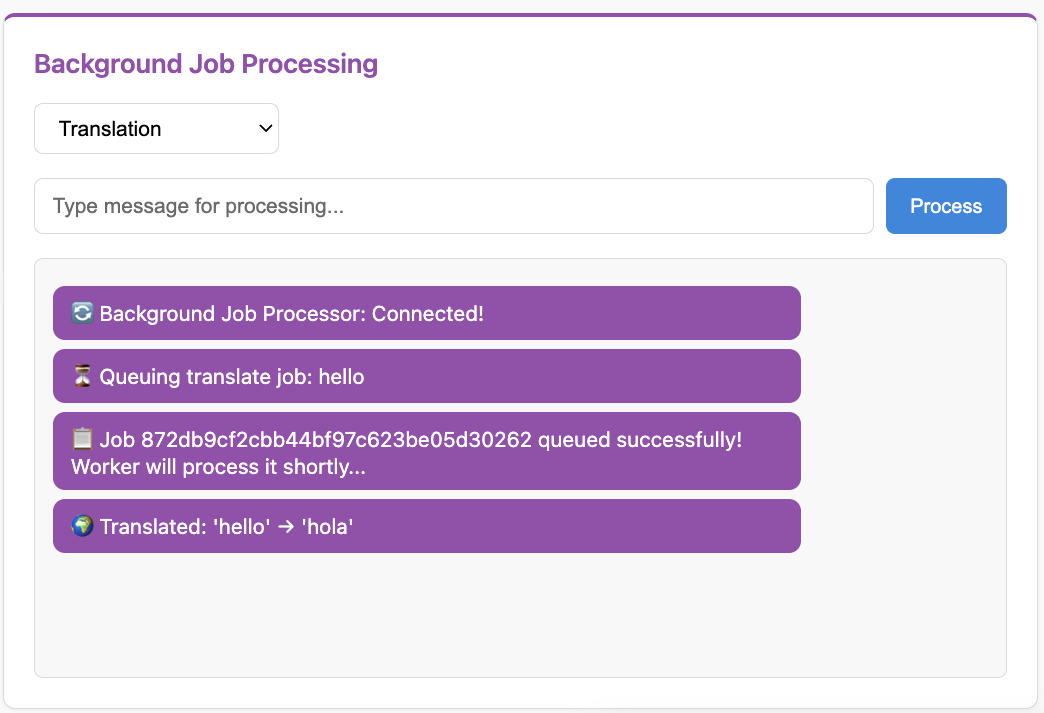
The screenshot shows the complete job flow: connection established → queuing → queued → translated result.
5. Watch the worker (if running separately):
If you used Option B (two terminals), check the ARQ worker terminal to see:
[timestamp] Job started: translate
[timestamp] Job complete: translate
6. Test multiple jobs:
Submit several jobs simultaneously - ARQ processes them (potentially in parallel based on max_jobs setting).
Understanding the Flow
Complete flow when client submits a job:
Client → WebSocket:
{"action": "job", "payload": {"type": "translate", "content": "hello"}}
WebSocket handler:
Sends "queuing" status to client
Calls
queue_job()→ adds to ARQ queue withchannel_nameSends "queued" status to client
ARQ worker (separate process):
Picks up job from Redis queue
Executes
translate()functionCalls
BackgroundJobConsumer.send_event(JobResult(...), channel_name)
Channel layer:
Routes
JobResultto specificchannel_name
Event handler:
Receives
JobResultReturns
JobStatusMessageAutomatically sent to WebSocket client
Client receives result:
{"action": "job_status", "payload": {"status": "result", "message": "🌍 Translated: ..."}}
Key Concepts Review
ARQ Setup:
Async task functions with
ctxparameterWorkerSettingsclass for configurationon_startup/on_shutdownhooks
Event Handlers:
Use
@event_handlerdecoratorReceive messages from channel layer (not WebSocket)
Routing depends on how event was sent (
send_eventvsbroadcast_event)
Sending to Specific Clients:
send_event(message, channel_name)- Send to one clientWorker stores
channel_namewhen job is queuedUses channel layer to route message back
Generic Type Parameter:
BaseConsumer[EventType]- Type-safe event handlingBetter IDE support and type checking
Optional but recommended
What's Next?
You've built a background job processing system! You now understand:
✅ ARQ worker setup and configuration
✅ WebSocket → Background Task → WebSocket flow
✅ Event handlers with
@event_handler✅ Sending messages to specific clients
✅ Running multiple services together
In the next part, you'll explore multi-layer messaging with:
External scripts sending WebSocket messages
HTTP endpoints triggering WebSocket notifications
Cross-consumer communication