Part 2: Room Chat with Channel Layers
In this part, you'll build a room-based chat system using channel layers. This demonstrates:
Setting up channel layers with Redis
Dynamic URL routing with path parameters
Group-based broadcasting
Room isolation
Join/leave notifications
Starting Point
Make sure you've completed Part 1. If you want to start fresh from checkpoint 1:
git checkout cp1
git reset --hard
Understanding Room Chat
The room chat system works as follows:
Client connects to
ws://localhost:8000/ws/room/{room_name}Server adds client to the room's channel layer group
Server broadcasts join notification to other room members
Client sends message → Server broadcasts to all in the same room
Client disconnects → Server broadcasts leave notification
Rooms are isolated - messages in one room don't appear in other rooms.
Step 1: Setup Channel Layers
Channel layers enable broadcasting messages between WebSocket connections. We'll use Redis for production-ready messaging.
Create src/layers.py:
"""
Channel layer definitions and registration.
This file centralizes all channel layer configuration for the application.
"""

import os

from fast_channels.layers import (
    InMemoryChannelLayer,
    has_layers,
    register_channel_layer,
)
from fast_channels.layers.redis import (
    RedisChannelLayer,
    RedisPubSubChannelLayer,
)

redis_url = os.getenv("REDIS_URL", "redis://localhost:6379")


def setup_layers(force: bool = False) -> None:
    """
    Set up and register all channel layers for the application.
    This should be called once during application startup.
    """
    # Get Redis URL from environment or use default
    if has_layers() and not force:
        return

    # Create different types of layers
    layers_config = {
        # In-memory layer for development/testing
        "memory": InMemoryChannelLayer(),
        # Redis Pub/Sub layer for real-time messaging
        "chat": RedisPubSubChannelLayer(hosts=[redis_url], prefix="chat"),
        # Redis Queue layer for reliable messaging
        "queue": RedisChannelLayer(
            hosts=[redis_url],
            prefix="queue",
            expiry=900,  # 15 minutes
            capacity=1000,
        ),
        # Notifications layer with different prefix
        "notifications": RedisPubSubChannelLayer(hosts=[redis_url], prefix="notify"),
        # Analytics layer for metrics/events
        "analytics": RedisChannelLayer(
            hosts=[redis_url],
            prefix="analytics",
            expiry=3600,  # 1 hour
            capacity=5000,
        ),
    }

    # Register all layers
    for alias, layer in layers_config.items():
        register_channel_layer(alias, layer)
Key points:
InMemoryChannelLayer - For development/testing (no Redis needed)
RedisPubSubChannelLayer - Real-time messaging with pub/sub pattern
RedisChannelLayer - Reliable queue-based messaging with expiry
Each layer has an alias (
"chat","queue", etc.) and different configurationThe
setup_layers()function registers all layers at startup
Update src/main.py to initialize channel layers:
# Uncomment these lines:
from src.layers import setup_layers

setup_layers()
Step 2: Define Message Types
Create the app directory and init file:
mkdir -p src/apps/room_chat
touch src/apps/room_chat/__init__.py
Create src/apps/room_chat/messages.py:
"""
Message types for the room chat consumer.
"""

from typing import Literal

from chanx.messages.base import BaseMessage
from pydantic import BaseModel


class RoomMessagePayload(BaseModel):
    message: str
    room_name: str | None = None


class RoomChatMessage(BaseMessage):
    """Room chat message."""

    action: Literal["room_chat"] = "room_chat"
    payload: RoomMessagePayload


class RoomNotificationMessage(BaseMessage):
    """Room notification message."""

    action: Literal["room_notification"] = "room_notification"
    payload: RoomMessagePayload
Key points:
RoomMessagePayload- Contains message and optional room_nameRoomChatMessage- Client sends this to post messagesRoomNotificationMessage- Server broadcasts this to room members
Step 3: Create Room Chat Consumer
Create src/apps/room_chat/consumer.py:
"""
Room Chat Consumer - Dynamic room-based messaging.
"""

from typing import Any

from chanx.core.decorators import channel, ws_handler
from chanx.messages.incoming import PingMessage
from chanx.messages.outgoing import PongMessage
from fast_channels.type_defs import WebSocketDisconnectEvent

from src.base_consumer import BaseConsumer

from .messages import RoomChatMessage, RoomMessagePayload, RoomNotificationMessage


@channel(
    name="room_chat",
    description="Room Chat Consumer - Dynamic room-based messaging",
    tags=["chat", "rooms"],
)
class RoomChatConsumer(BaseConsumer):
    """
    Consumer for room-based chat where users can join specific rooms.
    """

    channel_layer_alias = "chat"

    def __init__(self, *args: Any, **kwargs: Any):
        super().__init__(*args, **kwargs)
        self.room_name: str | None = None
        self.room_group_name: str | None = None

    @ws_handler(
        summary="Handle ping requests",
        description="Simple ping-pong for connectivity testing",
    )
    async def handle_ping(self, _message: PingMessage) -> PongMessage:
        return PongMessage()

    @ws_handler(
        summary="Handle room chat messages",
        description="Process room chat messages and broadcast to room members",
        output_type=RoomNotificationMessage,
    )
    async def handle_room_chat(self, message: RoomChatMessage) -> None:
        """Handle incoming room chat messages."""
        assert self.room_group_name
        await self.broadcast_message(
            RoomNotificationMessage(
                payload=RoomMessagePayload(
                    message=f"💬 {message.payload.message}",
                    room_name=self.room_name,
                )
            ),
            groups=[self.room_group_name],
        )

    async def post_authentication(self) -> None:
        """Join room and send join notification."""
        # Extract room name from path parameters
        self.room_name = self.scope["path_params"]["room_name"]
        self.room_group_name = f"room_{self.room_name}"

        # Join room group
        await self.channel_layer.group_add(self.room_group_name, self.channel_name)

        # Add room to groups
        if self.room_group_name not in self.groups:
            self.groups.append(self.room_group_name)

        # Send join notification to the room
        await self.broadcast_message(
            RoomNotificationMessage(
                payload=RoomMessagePayload(
                    message=f"🚪 Someone joined room '{self.room_name}'",
                    room_name=self.room_name,
                )
            ),
            groups=[self.room_group_name],
            exclude_current=True,
        )

    async def websocket_disconnect(self, message: WebSocketDisconnectEvent) -> None:
        """Send leave notification when user disconnects."""
        if self.room_group_name:
            # Send leave notification to the room
            await self.broadcast_message(
                RoomNotificationMessage(
                    payload=RoomMessagePayload(
                        message=f"👋 Someone left room '{self.room_name}'",
                        room_name=self.room_name,
                    )
                ),
                groups=[self.room_group_name],
                exclude_current=True,
            )

            # Leave room group
            await self.channel_layer.group_discard(
                self.room_group_name, self.channel_name
            )

        await super().websocket_disconnect(message)
Understanding the consumer:
Selecting a channel layer:
channel_layer_alias = "chat"
This tells the consumer to use the "chat" channel layer we defined in layers.py. Since we have multiple layers configured (chat, queue, notifications, etc.), this specifies which one to use for this consumer.
Storing room information:
def __init__(self, *args: Any, **kwargs: Any):
    super().__init__(*args, **kwargs)
    self.room_name: str | None = None
    self.room_group_name: str | None = None
Each WebSocket connection is a separate instance of the consumer. We store the room name and group name as instance variables so we can use them throughout the connection's lifetime.
Broadcasting chat messages:
@ws_handler(output_type=RoomNotificationMessage)
async def handle_room_chat(self, message: RoomChatMessage) -> None:
    await self.broadcast_message(
        RoomNotificationMessage(...),
        groups=[self.room_group_name],
    )
When a user sends a chat message, this handler broadcasts it to everyone in the same room. The groups=[self.room_group_name] parameter ensures the message only goes to people in this specific room, not to other rooms.
Joining a room (post_authentication):
async def post_authentication(self) -> None:
    # Get room name from URL: /room/general -> "general"
    self.room_name = self.scope["path_params"]["room_name"]
    self.room_group_name = f"room_{self.room_name}"

    # Add this connection to the room's group
    await self.channel_layer.group_add(self.room_group_name, self.channel_name)

    # Track the group for automatic cleanup
    self.groups.append(self.room_group_name)

    # Tell others someone joined (but not the person who joined)
    await self.broadcast_message(..., exclude_current=True)
This runs automatically after a client connects. It extracts the room name from the URL, creates a unique group identifier, and adds this connection to that group. The exclude_current=True means the person joining won't see their own join message.
Leaving a room (websocket_disconnect):
async def websocket_disconnect(self, message: WebSocketDisconnectEvent) -> None:
    # Tell others someone left
    await self.broadcast_message(..., exclude_current=True)

    # Remove this connection from the room
    await self.channel_layer.group_discard(self.room_group_name, self.channel_name)

    # Call parent cleanup
    await super().websocket_disconnect(message)
This runs automatically when a client disconnects (closes the browser, navigates away, etc.). It notifies other room members and properly removes the connection from the group.
Step 4: Register the WebSocket Route
Edit src/main.py and uncomment the room chat code:
# Uncomment:
from src.apps.room_chat.consumer import (
    RoomChatConsumer,  # Dynamic room connections
)

# ... later:
ws_router.add_websocket_route(
    "/room/{room_name}", RoomChatConsumer.as_asgi()
)  # Dynamic room connections
The {room_name} is a path parameter that FastAPI captures and makes available in scope["path_params"].
Step 5: Test Room Chat
1. Ensure Redis is running:
docker compose up -d
2. Start the server:
uvicorn src.main:app --reload
3. Test with multiple clients:
Open http://localhost:8000 in 2-3 different browser tabs/windows.
4. Join the same room:
In each tab:
Navigate to the Room Chat page
Enter the same room name (e.g., "general")
The page auto-connects
You should see:
In tabs 2 and 3: "🚪 Someone joined room 'general'" (when each new person joins)
Tab 1 doesn't see their own join message (
exclude_current=True)
5. Send messages:
Type a message in any tab and send
It appears in all tabs with the 💬 prefix
Only visible to users in the same room
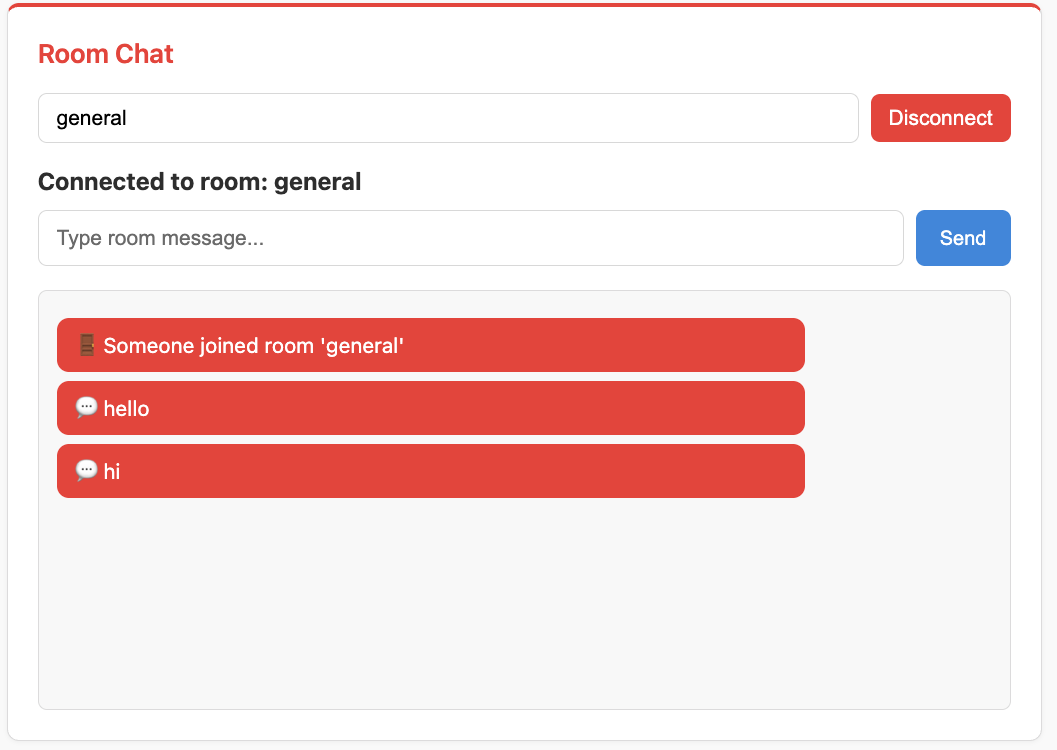
The first client to join sees the join notification when a second client connects, followed by chat messages from both clients.
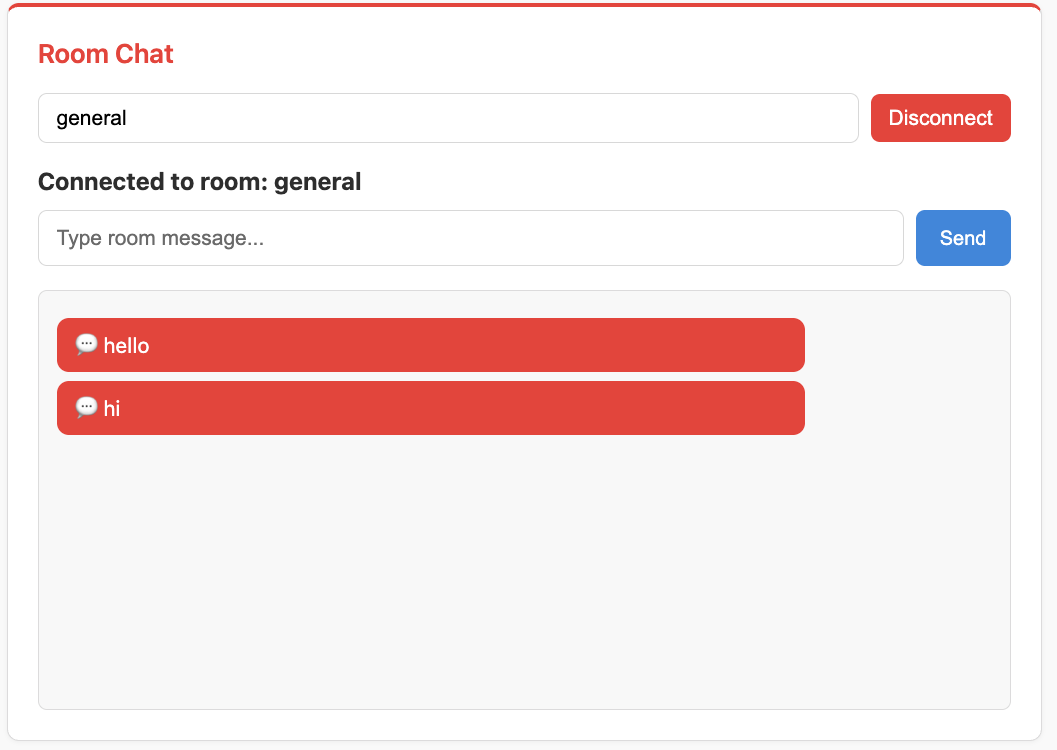
The second client doesn't see their own join message (exclude_current=True), only the chat messages.
6. Test room isolation:
Open another tab and join a different room (e.g., "private"):
Messages in "general" don't appear in "private"
Each room is completely isolated
7. Test leave notifications:
Close one of the tabs - other tabs in the same room should see: "👋 Someone left room 'general'"
Understanding Channel Layers
Group Operations:
# Join a group
await self.channel_layer.group_add(group_name, self.channel_name)

# Leave a group
await self.channel_layer.group_discard(group_name, self.channel_name)
Broadcasting:
# Broadcast to specific groups
await self.broadcast_message(
    message,
    groups=["room_general"],
    exclude_current=True  # Don't send to sender
)
Channel Layer Types:
Pub/Sub (
RedisPubSubChannelLayer) - Real-time, messages not persistedQueue (
RedisChannelLayer) - Reliable, messages queued with expiryIn-Memory (
InMemoryChannelLayer) - Single process, no Redis needed
Note
For more details on channel layers, visit the fast-channels documentation: https://fast-channels.readthedocs.io/en/latest/index.html
Key Concepts Review
Channel Layers:
Enable broadcasting between WebSocket connections
Multiple types: Pub/Sub, Queue, In-Memory
Each has an alias for consumer selection
Dynamic Routing:
URL path parameters:
/room/{room_name}Access via
scope["path_params"]["room_name"]
Group Management:
group_add()- Join a groupgroup_discard()- Leave a groupself.groups- List for automatic cleanup
Broadcasting:
broadcast_message(groups=[...])- Send to specific groupsexclude_current=True- Don't send to sender
What's Next?
You've built a room-based chat system! You now understand:
✅ Channel layer setup with Redis
✅ Dynamic URL routing with path parameters
✅ Group-based broadcasting
✅ Room isolation
✅ Join/leave notifications
In the next part, you'll build a background job system with:
ARQ worker integration
WebSocket → Background Task → WebSocket flow
Event handlers
Job result notifications